

This guide explains how to cancel YouTube TV 2026 in about five minutes using a phone, tablet, or computer. It also covers when pausing is better than canceling, what happens to DVR recordings, and whether YouTube TV will refund a recent payment аs noted by Baltimore Chronicle.
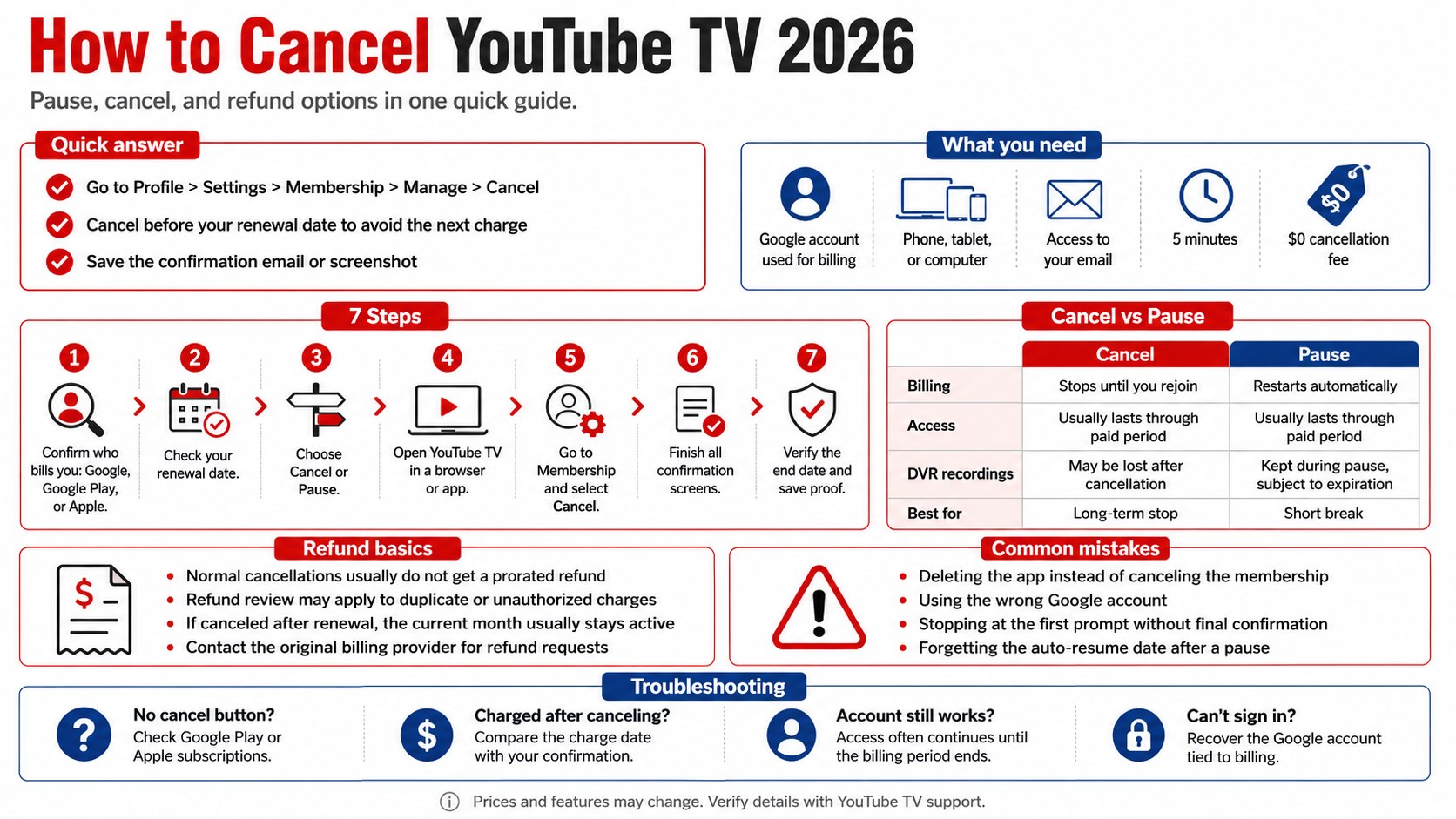
For most subscribers, the fastest route is YouTube TV > profile photo > Settings > Membership > Manage > Cancel. Complete every confirmation screen and save the cancellation email or a screenshot showing the final access date.
Key takeaways
- Cancel before the renewal date to stop the next monthly charge. Access usually continues through the paid billing period.
- Pause service when the break is temporary, but remember that billing restarts automatically on the selected date.
- Standard cancellations generally do not produce prorated refunds, although duplicate or unauthorized charges may qualify for review.
What you need
- The Google account used to purchase YouTube TV
- A phone, tablet, or computer with a web browser
- Access to the account’s email address
- Your next renewal date
- Your latest credit-card or bank statement
- About five minutes
- No cancellation fee
As of 2026, YouTube TV’s standard Base Plan costs about $83 per month before taxes, promotions, premium add-ons, and optional packages. Subscribers in California, Texas, Florida, New York, Maryland, and other supported US locations use the same account-management process, although local channels and taxes vary by ZIP code.
YouTube TV may not be the only recurring service affecting the household budget. Subscribers reviewing several entertainment accounts can follow the same billing checks described in Baltimore Chronicle’s guide to canceling Apple Music in 2026.
Step 1: Confirm who bills your YouTube TV account
Open YouTube TV, select your profile photo, and review Settings > Billing or Membership. Check whether the charge comes directly from Google, Google Play, Apple, or another provider.
This matters because the company collecting the payment controls the cancellation and refund process. A membership purchased through Apple may need to be managed through Apple subscriptions rather than the standard YouTube TV billing screen.
A common mistake is checking the wrong Google account. Review personal, work, and family accounts if the membership does not appear where expected.
| Billing method | Where to manage it | Pause availability | Refund contact |
|---|---|---|---|
| Direct YouTube TV billing | YouTube TV Settings | Generally available | YouTube TV support |
| Google Play | Google Play subscriptions | May vary | Google Play |
| Apple billing | Apple subscriptions | Depends on billing setup | Apple |
| Third-party promotion | Provider account or offer terms | Varies | Billing provider |
Check the description beside the latest statement charge. Google transactions may display wording such as GOOGLE *YouTube TV, while Apple-billed subscriptions can appear as APPLE.COM/BILL.
Do not dispute the payment before confirming the merchant. A bank can identify the payment processor, but it cannot cancel the underlying membership inside Google or Apple.
Step 2: Check your renewal date before canceling
Find the next billing date under Membership and compare it with the date on your latest debit-card, credit-card, or Google Payments statement. Cancel before that renewal date if the goal is to prevent another full monthly charge.
A request to cancel YouTube TV subscription billing normally takes effect at the end of the current paid period. Access usually continues until that date, so canceling several days early does not normally remove the remaining service.
Do not assume deleting the YouTube TV app stops billing. Removing an app from a Roku, Apple TV, Fire TV, smart TV, phone, or tablet does not cancel the membership.
Treat the confirmation page and cancellation email as transaction records. They establish when the request was completed and which account was used.
Free trials require closer attention because the first payment can be collected when the promotional period ends. Baltimore Chronicle’s report on avoiding automatic subscription charges after paid trials explains why deleting an app or stopping use does not prevent renewal.
Set a calendar reminder at least 24 hours before the displayed renewal time. This creates room to recover a password, switch accounts, or contact support if the cancellation button is missing.
Step 3: Decide whether to cancel or pause YouTube TV
Choose cancellation when you do not expect to return soon, need to remove the monthly expense, or plan to switch to another live-TV provider.
Choose pause YouTube TV membership when the interruption is temporary. Common reasons include an extended trip, seasonal sports viewing, a move, or a short-term household budget reduction.
Eligible subscribers billed directly by YouTube TV can generally pause service for a period selected inside the membership settings. The available duration and restart date should be confirmed on the account screen in 2026.
The pause begins after the current billing period. YouTube TV automatically resumes service and charges the saved payment method when the selected pause ends.
Pausing can preserve existing library recordings, subject to YouTube TV’s normal recording expiration rules. Subscribers cannot watch live television or create new recordings while the membership is paused.
The common mistake is forgetting the restart date. Add a calendar reminder several days before service resumes because the full monthly charge can post automatically.
| Question | Cancel | Pause |
|---|---|---|
| Future billing | Stops until the customer subscribes again | Restarts automatically |
| Current paid access | Usually continues to period end | Usually continues to period end |
| Saved recordings | Access ends after cancellation | Generally retained during the pause |
| Best for | Long-term departure | Temporary break |
| Restart action | Manual resubscription | Automatic |
Price increases can make cancellation more attractive when a household also pays for YouTube Premium, Netflix, Hulu, Disney+, Max, or sports packages. Baltimore Chronicle’s coverage of YouTube Premium pricing in 2026 provides another reference point for comparing Google-owned subscriptions.
Step 4: Cancel YouTube TV in a browser
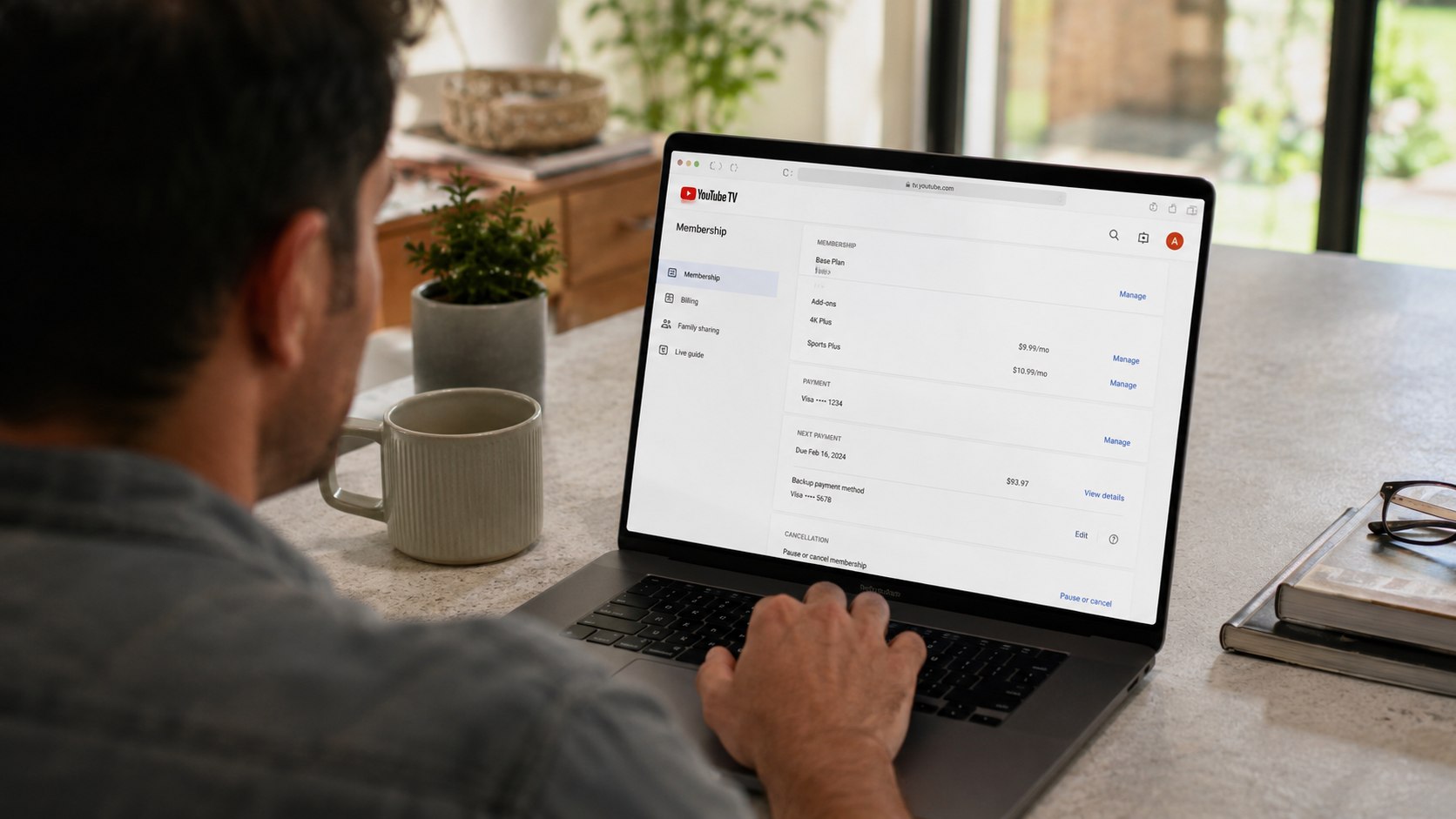
Go to the YouTube TV website in a mobile or desktop browser and sign in. Select the profile photo, open Settings, choose Membership, select Manage, and click Cancel membership.
Follow the retention screens until the service displays a final cancellation confirmation. YouTube TV may offer a pause, temporary discount, or survey before presenting the last cancellation button.
This sequence matters because selecting Manage or choosing a reason for leaving does not complete the cancellation. Continue until the account displays the expiration date or confirms that recurring billing has stopped.
The most common mistake is closing the browser after the first cancellation prompt. Google’s official YouTube TV cancellation and pause instructions show the current account-management route.
- Sign in to the Google account paying for YouTube TV.
- Select the profile photo.
- Open Settings.
- Select Membership.
- Choose Manage.
- Select Cancel membership.
- Decline the pause option when permanent cancellation is intended.
- Complete the final confirmation screen.
- Save the email or take a screenshot showing the access end date.
Check the page again after signing out and back in. The membership area should show a cancellation date or an option to restart the subscription rather than a future automatic renewal.
Step 5: Cancel through Android, Google Play, or Apple
On Android, open the YouTube TV app, tap the profile photo, and look for Settings > Membership > Manage. The app may send the subscriber to a browser or Google Play to finish the process.
When Google Play controls the subscription, open the Google Play Store and select the profile icon. Choose Payments & subscriptions > Subscriptions > YouTube TV > Cancel subscription.
For Apple billing, open Settings on the iPhone or iPad and tap the Apple Account name. Choose Subscriptions, select YouTube TV, and follow Apple’s cancellation prompts.
Older memberships may still use Apple billing even when YouTube TV is now watched on a Roku, Samsung TV, Google TV device, or Windows computer. The device used for viewing does not determine who processes the payment.
Using the correct billing platform removes the recurring authorization from the system that created it. YouTube TV may not be able to issue refunds for transactions processed by Apple or another provider.
A common mistake is searching only inside the YouTube TV app. When no cancellation button appears, review the device’s subscription-management page and the original purchase receipt.
Step 6: Check add-ons and family accounts
Review premium networks, sports packages, and other paid extras listed under Membership. Confirm whether they end with the Base Plan or have separate billing terms.
This matters because NFL Sunday Ticket, premium channels, and promotional packages may follow different cancellation or refund rules. Some products can be billed annually or through a separate purchase.
A common mistake is assuming that every Google video service belongs to one subscription. YouTube TV, YouTube Premium, YouTube Music Premium, and individual channel memberships are separate products.
The YouTube TV family manager controls the paid membership. Family members can leave a Google family group, but leaving the group does not necessarily cancel the subscription charged to the manager.
Before closing the account, household members should review saved recordings and scheduled programs. Cancellation can remove access to the shared library after the paid period ends.
Step 7: Verify cancellation and review refund options
Return to Membership and confirm that the page shows an access end date rather than a future renewal date. Search the connected email inbox for a cancellation message and check the payment account after the expected billing date.
Standard YouTube TV refund policy terms generally do not provide refunds or credits for a partially used billing period. Canceling shortly after renewal normally stops the following month’s charge rather than reversing the payment that already posted.
A refund review may still be appropriate when the charge was unauthorized, duplicated, processed after a completed cancellation, or connected to a confirmed service problem.
Submit the request through the company that processed the payment. Include the transaction date, amount, account email, screenshots, and cancellation confirmation.
Google’s official YouTube TV refund guidance explains how direct and third-party billing affect refund requests.
Do not file simultaneous claims with Google, Apple, and a card issuer for the same transaction. Duplicate disputes can complicate the review and may temporarily restrict the associated account.
Contact the payment processor first when the charge is still pending. Some pending transactions disappear automatically, while a posted charge may require a formal refund request.
Troubleshooting YouTube TV cancellation problems
- No cancel button appears: Switch Google accounts, check Google Play or Apple subscriptions, and locate the original purchase receipt.
- You were charged after canceling: Compare the charge date with the cancellation timestamp. A charge processed before cancellation may cover the final billing period.
- The account still works: Continued access is normal until the end of the paid period and does not necessarily mean cancellation failed.
- The pause option is unavailable: The billing method, promotion, or account status may not support pausing. Cancel and rejoin later instead.
- You cannot sign in: Recover the Google account tied to the billing email, then contact YouTube TV support with the transaction details.
- A family member cannot cancel: The Google family manager or account owner must manage the paid membership.
- A premium add-on still appears: Open Membership and verify the cancellation status of each package separately.
Frequently asked questions
Does canceling YouTube TV stop service immediately?
No. In most cases, access continues through the end of the current paid billing period.
The account page should display the date on which live channels, recordings, and other membership benefits will end.
Can I cancel YouTube TV during a free trial?
Yes. Cancel before the trial’s displayed expiration time to prevent conversion to a paid plan.
The account may retain access until the trial ends. Save the confirmation rather than relying on whether streaming still works.
Will I receive a refund after I cancel?
Usually not for a normal cancellation or an unused portion of the month.
Refund requests are more relevant to unauthorized charges, duplicate billing, technical failures, or payments collected after a documented cancellation.
How long can I pause YouTube TV?
The account’s Membership screen shows the pause durations available to that subscriber in 2026.
Billing and service restart automatically on the selected date unless the membership is canceled before the pause ends.
What happens to DVR recordings after cancellation?
Canceling removes access to the library when the paid period ends. Recordings may not be available if the customer subscribes again later.
Paused accounts generally retain recordings during the pause, but individual recordings remain subject to YouTube TV’s expiration rules.
Is there a fee to cancel YouTube TV?
The standard monthly Base Plan does not have a cancellation fee.
Separate seasonal products, annual purchases, promotional commitments, or add-ons may have different terms. Review each item under Membership before ending the main subscription.
Earlier we wrote about How to Read a Construction Estimate: Line Items, Allowances, and Costs