


If you need to stop paying for Hulu, the process usually takes less than 10 minutes. The most important step is identifying who bills your subscription because Hulu, Apple, Google Play, Roku, Verizon, and Disney Bundle plans all use different cancellation paths, аs noted by Baltimore Chronicle.
This guide explains how to cancel hulu subscription 2026, what happens after cancellation, how Disney Bundle subscriptions work, and how to avoid unexpected charges. Most readers can solve the problem in the first few steps, while the remaining sections cover billing details, troubleshooting, and account management.
Key Takeaways
- Cancel through the company that bills you, not necessarily through Hulu itself.
- Disney Bundle subscribers may need to manage changes through Disney account settings rather than Hulu.
- Most Hulu plans remain active until the end of the current billing cycle after cancellation.
What You Need
- Hulu account credentials
- Access to the email address associated with the account
- A computer, smartphone, or tablet
- 5–10 minutes
- Knowledge of whether Hulu, Apple, Google, Roku, Verizon, or Disney processes your payment
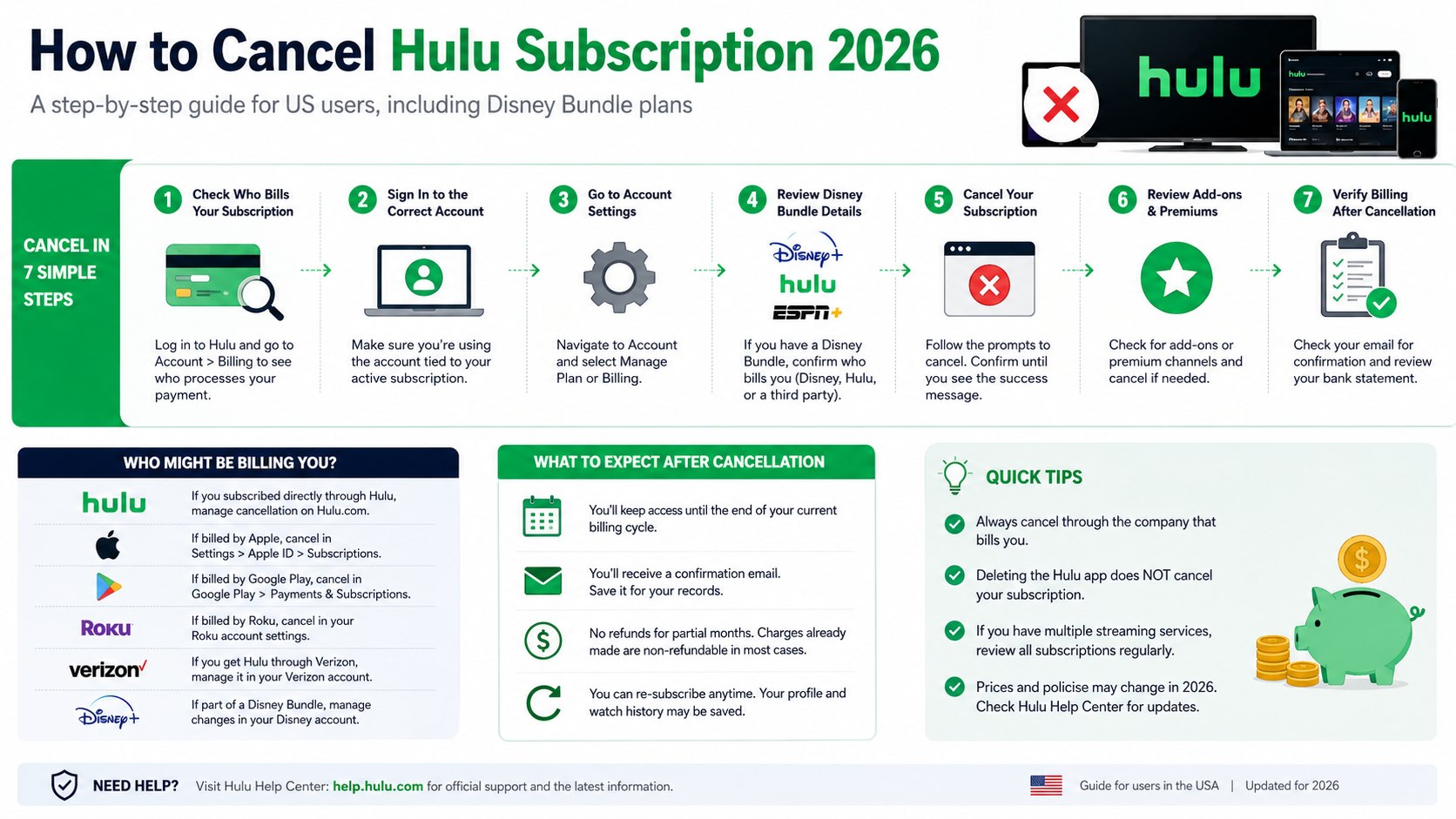
Step 1: Determine Who Bills Your Hulu Subscription
Before attempting cancellation, sign into your account and review the billing section. Hulu only allows direct cancellation for subscriptions billed by Hulu.
If payments are handled through Apple App Store, Google Play, Roku, Verizon, or another provider, you must cancel through that company instead.
Why it matters: The cancellation option may not appear if another company manages billing.
Common mistake: Trying to cancel inside Hulu when the subscription was purchased through a third-party service.
Many Americans reviewing streaming expenses are also reassessing larger household budgets. Baltimore Chronicle’s article on how much down payment for a house in 2026 highlights how recurring monthly expenses can affect long-term financial planning.
Step 2: Sign Into the Correct Hulu Account
Households often maintain multiple streaming accounts. Before making changes, verify that you’re logged into the account connected to the active subscription.
Review the account email, billing date, and current plan information.
Why it matters: Many cancellation issues occur because users access an inactive account.
Common mistake: Canceling the wrong account while the paid subscription remains active elsewhere.
Step 3: Open Account Settings and Locate Subscription Controls
After signing in, navigate to Account Settings and locate the billing or subscription management section. Hulu periodically updates its interface, but subscription controls remain within account management.
Select the option labeled Manage Plan, Billing, or Cancel Subscription.
Why it matters: This section displays active plans, add-ons, and billing information.
Common mistake: Confusing account deletion with subscription cancellation.
Step 4: Review Disney Bundle Details Before Canceling
The Disney Bundle cancellation process creates the most confusion for Hulu subscribers. Millions of US customers receive Hulu together with Disney+ and ESPN+ under a combined package.
Common Disney Bundle Configurations in 2026
- Disney+ and Hulu
- Disney+, Hulu, and ESPN+
- Disney+, Hulu, ESPN+, and premium add-ons
- Carrier-sponsored bundles through providers such as Verizon
Depending on the billing arrangement, canceling Hulu may affect the entire package or require changes through Disney account management.
Why it matters: Bundle subscribers often discover that Hulu cannot independently process the cancellation.
Common mistake: Assuming Hulu controls all Disney Bundle billing.
Before making changes, confirm whether your Disney Bundle is billed through Hulu, Disney, Verizon, or another provider.
Step 5: Complete the Hulu Cancellation Process
Follow the prompts until you reach the final confirmation page. Hulu may offer discounted plans, account pauses, or retention offers before completing the request.
Continue through every confirmation screen until cancellation is finalized.
Why it matters: Closing the browser too early can leave the subscription active.
Common mistake: Assuming cancellation succeeded without receiving confirmation.
Signs Your Cancellation Was Successful
- Confirmation page appears
- Confirmation email arrives
- Account status changes
- Expiration date is displayed
Save the confirmation email until the current billing cycle has ended.
Step 6: Review Add-Ons and Premium Services
Some subscribers pay for premium channels or enhanced plans in addition to standard Hulu service. These may include Live TV packages and premium entertainment channels.
| Subscription Feature | What Usually Happens After Cancellation |
|---|---|
| Standard Hulu | Access continues until billing cycle ends |
| Live TV Plan | Ends on account expiration date |
| Disney Bundle | Depends on billing provider |
| Premium Add-ons | May require separate review |
Why it matters: Premium services can continue generating charges if not reviewed.
Common mistake: Assuming every add-on automatically disappears.
Step 7: Verify Billing After Cancellation
After the service period ends, review your bank account or credit card statement. Confirm that no new Hulu charges appear.
Unexpected charges should be investigated immediately.
Why it matters: Early detection simplifies dispute resolution.
Common mistake: Never checking statements after cancellation.
If an unexpected charge appears, Baltimore Chronicle’s guide on how to request a refund for a paid service provides practical advice that can also apply when resolving subscription billing issues.
Alternative Cancellation Methods
Cancel Hulu Through Apple
If Apple bills your account, open Apple subscription settings and cancel Hulu there. The cancellation option may not be available through Hulu.
Cancel Hulu Through Google Play
Android users should manage subscriptions through Google Play account settings.
Cancel Hulu Through Roku
Roku subscribers can cancel through the Roku device interface or Roku account portal.
Cancel Hulu Through Verizon
Customers receiving Hulu through Verizon promotions typically need to manage changes within their Verizon account.
Understanding Hulu Pricing and Streaming Costs in 2026
Streaming costs continue to increase across the entertainment industry. Hulu pricing varies based on plan type, advertising preferences, Live TV options, and bundle selections.
Consumers comparing monthly subscriptions may also find Baltimore Chronicle’s report on YouTube Premium’s latest price increase useful when evaluating overall entertainment spending.
Many households now subscribe to multiple services simultaneously, making regular subscription audits increasingly important.
Troubleshooting Hulu Cancellation Problems
- Cancel button missing: Another company likely handles billing.
- Still receiving charges: Verify that no secondary Hulu account exists.
- Cannot access account: Use password recovery before attempting cancellation.
- Disney Bundle confusion: Review billing ownership before making changes.
- No confirmation email: Check spam folders and account status.
Can You Pause Hulu Instead of Canceling?
Some subscribers may benefit from pausing service rather than canceling entirely. This option can preserve watch history and account preferences while reducing monthly expenses.
Availability depends on the account type and current Hulu policies.
Readers looking for additional ways to reduce recurring expenses can browse the Baltimore Chronicle personal finance section for budgeting and cost-control strategies.
Final Cancellation Checklist
- Identify the billing provider.
- Verify Disney Bundle status.
- Review premium add-ons.
- Complete all cancellation screens.
- Save the confirmation email.
- Check the service expiration date.
- Monitor future statements.
- Keep billing records until charges stop.
FAQ
Can I cancel Hulu and keep Disney+?
It depends on the bundle structure and billing arrangement. Some Disney Bundle plans allow service modifications, while others require bundle-level changes.
How long does Hulu stay active after cancellation?
Most subscriptions remain active until the current billing cycle ends. The expiration date should appear in your account settings.
Will deleting the Hulu app cancel my subscription?
No. Removing the application from a phone, tablet, smart TV, or streaming device does not stop recurring billing.
Why can’t I find the cancellation option?
The most common reason is third-party billing through Apple, Google Play, Roku, Verizon, or Disney.
Can I reactivate Hulu later?
In most cases, yes. Former subscribers can usually restart service using the same account credentials, subject to available plans and pricing.
Does Hulu offer refunds after cancellation?
Policies vary depending on the billing provider and circumstances. Most subscriptions continue until the end of the prepaid billing period rather than receiving a partial refund.
For official account guidance, visit Hulu Support: https://help.hulu.com
Earlier we wrote about How Long Do Washing Machines Last in 2026? Average Lifespan, Warning Signs, and Replacement Guide