

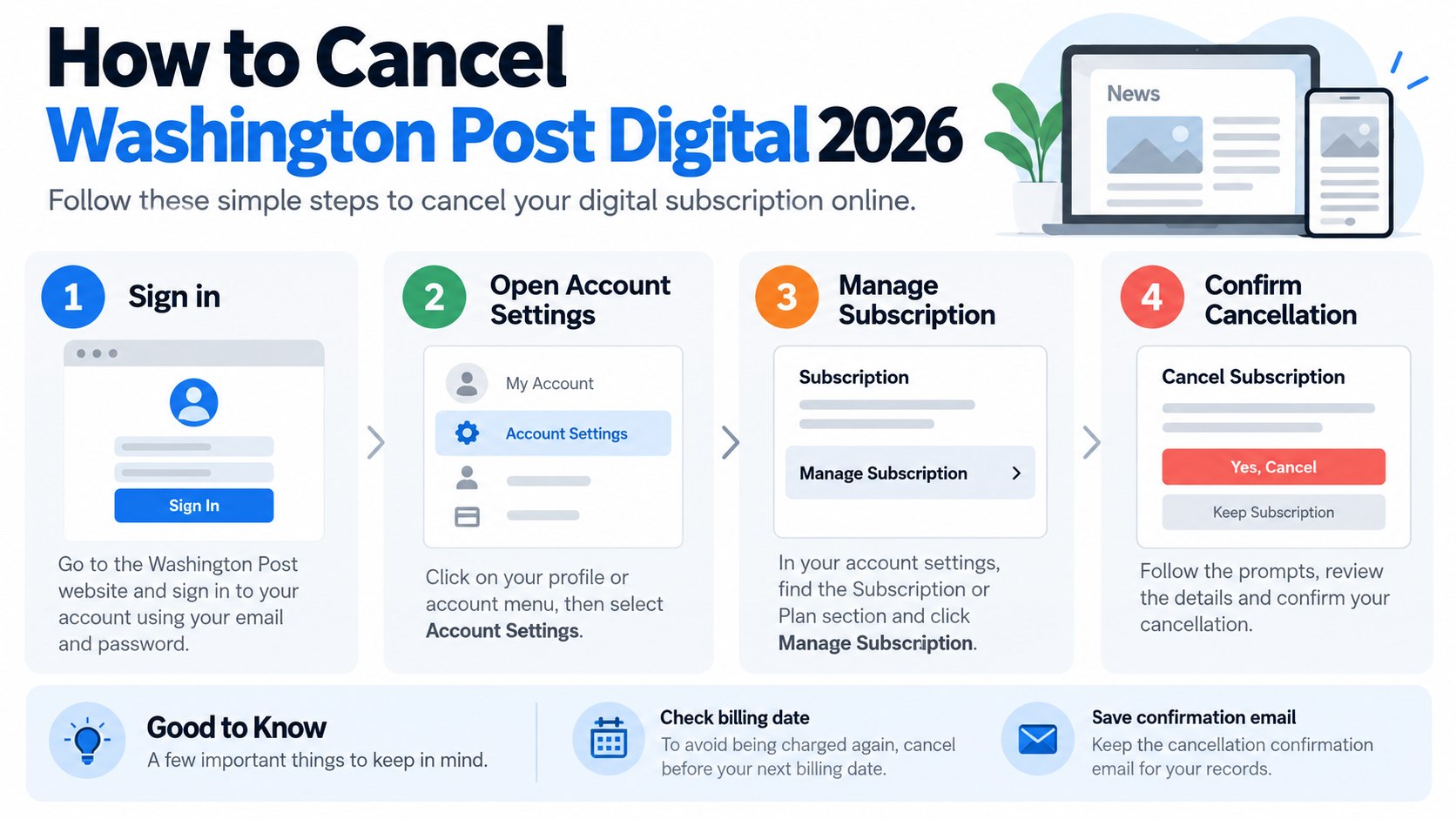
How to cancel Washington Post digital 2026 is straightforward when The Washington Post bills you directly. Sign in, open My Post, find your subscription settings, and complete the cancellation prompts. Most account holders can finish in several minutes. Apple, Amazon, and Google Play subscribers must cancel through the company handling their payment, as noted by Baltimore Chronicle.
Canceling normally stops the next renewal rather than cutting off paid access immediately. Direct digital subscribers usually retain access through the current billing period. The main complication is identifying who actually processes the recurring charge.
Key takeaways
- Direct Washington Post subscriptions can usually be canceled through My Post before the next billing period begins.
- Apple, Amazon, and Google Play purchases require cancellation through that provider, not only through WashingtonPost.com.
- If you call support, decide beforehand whether you want cancellation regardless of any retention offer.
Saving the final confirmation matters more than closing the browser quickly. Keep the email or screenshot until the next expected renewal date passes.
What you need before you cancel
Gather the account details before opening subscription settings. This reduces password resets and helps prevent canceling the wrong account in a household with several digital subscriptions.
- The email address associated with your Washington Post account
- Your account password or access to the password-reset email
- A recent card, PayPal, Apple, Amazon, or Google transaction
- Your approximate next renewal date
- A phone or computer with a web browser
- A screenshot tool for saving confirmation
- About 5–10 minutes for a normal online cancellation
A bank statement is particularly useful when the subscription does not appear where expected. The merchant name can reveal whether the payment comes directly from The Washington Post or another platform.
Do not begin by deleting the Washington Post app. Removing an app from a phone does not terminate a recurring subscription attached to an account.
The same principle applies to other recurring services. Baltimore Chronicle’s guide to canceling a New York Times subscription in 2026 explains why the billing company determines the cancellation path.
The account collecting the money is the account that must show a canceled or non-renewing status when the process is finished.
How to cancel Washington Post digital 2026 step by step
Step 1: Identify who bills your subscription
Check a recent receipt or card statement before signing in. Look for The Washington Post, Apple, Amazon, Google Play, or another recognizable billing provider.
This matters because The Washington Post cannot directly manage every subscription purchased through a third-party store. A common mistake is searching the Post account for a cancellation button when Apple or Google actually controls renewal.
Step 2: Sign in to the correct My Post account
Direct subscribers should open WashingtonPost.com and sign in with the email connected to the paid plan. Go to the account area and locate subscription or billing controls.
If the subscription seems missing, search your inbox for old Washington Post receipts. Households sometimes have separate accounts under a spouse’s email, an older Gmail address, or a work account.
Do not create a new account just because the existing subscription is not immediately visible. A second profile will not cancel billing on the original one.
Step 3: Open subscription management
Inside My Post, locate the subscription management area. The official Washington Post digital cancellation guidance directs subscribers who purchased directly from the company to manage cancellation through their My Post profile.
Review the plan and renewal information before pressing anything. Recording the next billing date gives you a reference point if a later charge needs to be questioned.
Step 4: Choose the cancellation option and continue
Select the option to cancel the digital subscription and continue through every confirmation screen. Do not assume that the first cancellation button immediately ends automatic renewal.
Some subscription services present alternatives before the final confirmation. These can include a different billing period, a lower-priced offer, or a prompt asking why you are leaving.
If a retention offer appears, compare it with your original goal. A lower price still creates another recurring payment unless the offer clearly changes that arrangement.
Step 5: Handle a phone retention offer without losing the cancellation
Customers who cannot resolve an account issue online can contact Washington Post customer support. The Help Center lists Washington Post customer service at 1-800-477-4679. Support hours can vary, so check the official Help Center before calling.
Before calling, decide whether price is the problem or whether you want the service ended regardless of price. That distinction keeps the conversation focused if an agent discusses alternatives.
- State that you want to stop automatic renewal.
- Ask for the effective cancellation date.
- Confirm whether access continues through the paid period.
- Ask whether any retention offer changes the renewal date.
- Request written confirmation of the final account status.
A retention proposal is not automatically a bad deal. It is simply a new decision. Compare the new rate, billing frequency, duration, and eventual renewal price.
Do not agree because the monthly amount sounds smaller without checking the full term. A temporary discount can still renew later under different pricing.
If the purpose of the call is permanent cancellation, repeat that request clearly after declining an offer. Ask the representative to confirm that future recurring charges have been stopped.
Write down the date and approximate time of the call. Keep any confirmation number or follow-up email.
Phone support is most useful when the account cannot be accessed, billing looks inconsistent, or the online cancellation controls do not match the payment record.
Step 6: Cancel through Apple, Amazon, or Google when necessary
If an app store handles billing, cancel through that provider. The Washington Post Help Center directs Apple, Amazon, and Google Play customers to the relevant platform procedures.
| Billing source | Where to cancel | Common mistake |
|---|---|---|
| Washington Post directly | My Post subscription settings | Deleting the app instead |
| Apple | Apple Account subscriptions | Checking the wrong Apple Account |
| Amazon | Amazon membership or subscription settings | Trying to cancel only through WashingtonPost.com |
| Google Play | Google Play subscriptions | Using another Google account |
Third-party billing can explain why a Washington Post account appears active but contains limited payment controls. The reading account and billing account are not always identical.
Check every Apple or Google account used on the device if the subscription does not appear immediately. Families often have more than 1 account connected to phones and tablets.
Amazon purchases present a similar issue. The Amazon account responsible for the transaction must manage its own renewal.
Do not remove a payment card as a substitute for cancellation. A failed transaction does not provide the same evidence as a properly terminated subscription.
Readers cleaning up several recurring expenses can also compare Baltimore Chronicle’s guides for canceling Apple Music and canceling Paramount Plus.
Step 7: Save proof and verify the expiration date
After cancellation, look for an account message or email showing that automatic renewal has ended. Save a screenshot that includes the date whenever possible.
The Washington Post states that direct digital subscriptions generally continue until the current billing period ends. Cancellation normally prevents the following billing cycle rather than automatically producing a refund for the unused portion of the current period.
- A confirmation screen is more useful than remembering that a button was clicked, especially when the renewal date is only days away.*
What happens after you cancel Washington Post digital access
A normal paid cancellation does not necessarily shut off access that day. Under the Post’s digital terms, cancellation generally becomes effective at the end of the current billing period, unless different rules apply to a particular offer or jurisdiction.
After paid access expires, the account may remain usable as a basic Washington Post account. Former subscribers can still receive whatever limited article access the publication offers to non-paying visitors.
Pricing is another reason to check the renewal date rather than relying on the price originally paid. Promotional offers can differ from later renewal pricing.
A cancellation should answer 3 questions: Has automatic renewal stopped? What is the final access date? Who processed the cancellation?
Those details are especially useful when reviewing household subscriptions across several cards. They separate a completed cancellation from a temporary payment problem.
What to do if you receive a retention offer
A Washington Post retention offer may change the economics of keeping the subscription, but only if the terms fit your actual reading habits. Treat the proposal as a fresh subscription decision rather than an obstacle.
Ask for the complete price and billing interval. A quoted amount every 4 weeks differs from a calendar-month charge because 13 four-week billing periods fit into 52 weeks.
Also ask when the discounted period ends and what the plan renews at afterward. The relevant number is the future recurring obligation, not only the first reduced payment.
If you intended to cancel because you rarely read the publication, even a sizable discount may not solve the original problem. If price alone caused the cancellation, a clearly documented lower rate may deserve consideration.
Never rely on a verbal impression that renewal has stopped. If you accept a revised plan, request written terms showing the price, billing schedule, and renewal conditions.
Troubleshooting Washington Post cancellation problems
Most failures come from account or billing mismatches rather than a complicated cancellation procedure. These checks cover the problems most likely to block cancel Washington Post subscription requests.
- No cancellation option appears: check whether Apple, Amazon, or Google Play controls the subscription.
- The subscription is missing: search old receipts for another email address or household account.
- You were charged after canceling: compare the charge date with your cancellation confirmation and renewal date.
- You cannot sign in: reset the password before creating another Washington Post account.
- Phone support offers another plan: ask whether accepting it restarts or changes automatic renewal.
A charge posted after cancellation is not automatically evidence of another renewal. Card transactions can appear after their authorization date, so compare dates carefully.
If the charge belongs to a new billing period, gather the confirmation email and payment record before contacting support. Specific dates make the issue easier to explain.
For a third-party purchase, contact the company that processed the payment. Third-party subscriptions generally follow that provider’s cancellation rules.
Federal subscription rules remain subject to regulatory and legal developments. For current federal guidance on recurring-payment practices, check the Federal Trade Commission’s Negative Option Rule page.
State consumer-protection laws can provide additional rights in particular disputes. Those rights depend on the transaction, billing method, and state involved.
FAQ
Can I cancel Washington Post digital online?
Yes. Subscribers billed directly by The Washington Post can generally cancel through their My Post account. The official help guidance directs digital-only subscribers to online subscription management.
What is the Washington Post cancellation phone number?
The Washington Post Help Center lists customer support at 1-800-477-4679. Online cancellation remains the documented route for many direct digital subscriptions, while phone support can help with account or billing problems.
Will Washington Post refund the rest of my billing period?
For standard direct digital subscriptions, cancellation normally stops future renewal rather than automatically refunding the current period. Access generally continues until that billing period ends.
Can I cancel a Washington Post subscription bought through Apple?
Yes, but the cancellation must be handled through Apple’s subscription system when Apple processed the purchase. The same principle applies to Amazon and Google Play purchases.
Does deleting the Washington Post app cancel the subscription?
No. Deleting an app removes software from the device but does not terminate the billing agreement. Use the subscription controls belonging to the company processing your payment.
How do I know Washington Post cancellation worked?
Check for a canceled or non-renewing account status and save the confirmation email or screenshot. Also note the final access date and monitor the next expected renewal date.
Earlier we wrote about Robot Vacuum vs Stick Vacuum 2026: Real Cleaning, Prices and Pet Hair Compared