

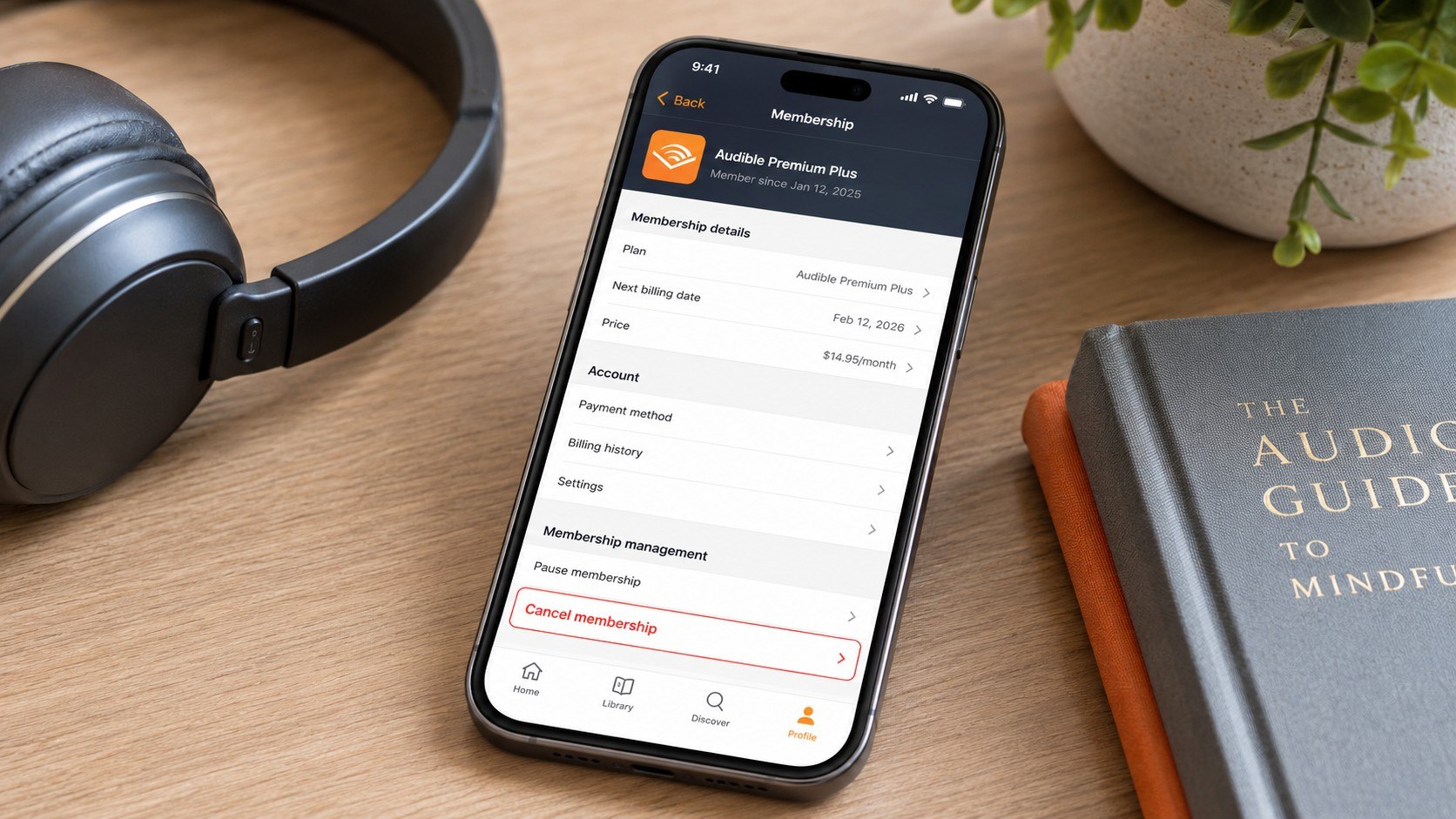
How to cancel Audible membership 2026 takes about 5 minutes when Audible bills you directly. Sign in through a desktop or mobile browser, use remaining credits, open Account Details, select Cancel Membership, and complete every confirmation screen, as noted by the editorial team at Baltimore Chronicle.
Cancel before the next renewal date if you want to avoid another charge. Do not delete the Audible app and assume the subscription has ended. Deleting an app does not stop recurring billing, and unused Premium Plus credits may disappear when the membership ends.
Key takeaways
- Spend every unused Premium Plus credit before canceling because Audible says remaining credits are lost when membership benefits end.
- Books purchased with credits or cash stay in your library, but Plus Catalog titles may become unavailable after cancellation.
- A cancellation does not automatically refund the latest fee. Contact Audible promptly if a renewal charge was unexpected.
After canceling, save the confirmation email and a screenshot showing your membership status. These records can help if another charge appears or customer support cannot immediately locate the cancellation.
What you need before canceling Audible
Prepare the account details before opening the cancellation page. The process is usually simple, but missing login information or using the wrong Amazon account can create delays.
- Your Audible or Amazon login credentials
- Access to the email address connected to the account
- A web browser on a phone, tablet, or computer
- Your current renewal date and membership type
- A list of unused Audible credits
- The payment card statement if you are seeking a refund
- About 5–10 minutes
Check whether the charge appears as Audible, Amazon, Apple, Google, or another billing provider. The company collecting the payment usually controls the cancellation process. A membership started through another platform may not show the same controls on Audible.com.
It also helps to review other recurring payments at the same time. Baltimore Chronicle’s guide to avoiding automatic subscription charges explains how free trials and promotional rates can become full-price renewals.
The most expensive mistake is canceling first and checking the credit balance later. Once the membership ends, customer support may not restore unused credits automatically.
Step 1: Confirm who bills your Audible membership
What to do: Sign in to Audible.com and open Account Details. Check your plan, renewal date, payment method, and billing history.
Why it matters: Audible can only display a direct cancellation route when Audible or Amazon manages the subscription.
Common mistake to avoid: Do not assume the account shown in the app is the account being charged. Many households have several Amazon profiles, email addresses, or payment cards.
Search your email for “Audible membership,” “membership renewal,” or “Audible receipt” if you cannot locate the correct account. You can also compare the transaction date and amount against your bank or credit card statement.
Step 2: Review your credits, library, and current plan
What to do: Check the credit counter before canceling. Use each remaining credit on an audiobook you expect to keep, even if you plan to listen later.
Why it matters: Audible states on its official cancellation page that unused credits are lost with membership benefits. Audiobooks bought with those credits remain in your library.
Common mistake to avoid: Do not confuse purchased audiobooks with Plus Catalog titles. Plus Catalog access depends on an active eligible membership.
Audible’s US prices can vary by promotion and account. Published 2026 offers include Audible Plus at about $7.95 per month, Standard at about $8.99 per month, and Premium Plus at about $14.95 per month. Annual Premium Plus options may cost approximately $149.50 for 12 credits or $229.50 for 24 credits. Verify the amount displayed in your account before making a decision.
| Account item | What normally happens after cancellation | Action before canceling |
|---|---|---|
| Unused Premium Plus credits | They may be lost when membership benefits end | Redeem them before confirming cancellation |
| Books purchased with credits | They remain in your Audible library | Confirm each title appears under Library |
| Books purchased with cash | They remain tied to the purchasing account | Keep receipts for expensive purchases |
| Plus Catalog titles | Access may end with the membership | Finish listening before the final access date |
| Monthly membership benefits | They end according to the displayed cancellation terms | Record the final benefit date |
The difference between ownership and catalog access explains many cancellation complaints. A purchased title has been added to your permanent Audible library. A Plus Catalog title is closer to a streamed subscription benefit.
Download status does not change that distinction. A downloaded Plus Catalog title can still become unavailable after membership access ends. Confirm ownership through your purchase history rather than relying on the download icon.
People tracking several media services may also find the Disney Plus cancellation guide useful. It explains why the billing provider must be identified before recurring charges can be stopped.
Step 3: Consider pausing or switching instead of canceling
What to do: Review any pause, lower-cost plan, or membership-switch offer shown in Account Details. Audible says eligible members may be able to pause payments for up to 90 days within a 12-month period.
Why it matters: A temporary pause can preserve the account relationship while giving you time to finish purchased books or reduce short-term expenses.
Common mistake to avoid: Do not accept a retention offer without reading its next billing date, future price, and credit rules.
A pause is most useful when the problem is timing rather than dissatisfaction. For example, a parent with several unread audiobooks may need 2 months without another credit. A freelancer cutting expenses permanently may be better served by full cancellation.
“Your unused credits will be lost along with your other membership benefits.”
— Audible Help, cancellation guidance for US members, accessed in 2026.
The warning is direct, but the final timing can depend on the membership and billing arrangement shown in your account. Read the confirmation page before selecting the last cancellation button.
Step 4: Cancel the Audible membership in a browser
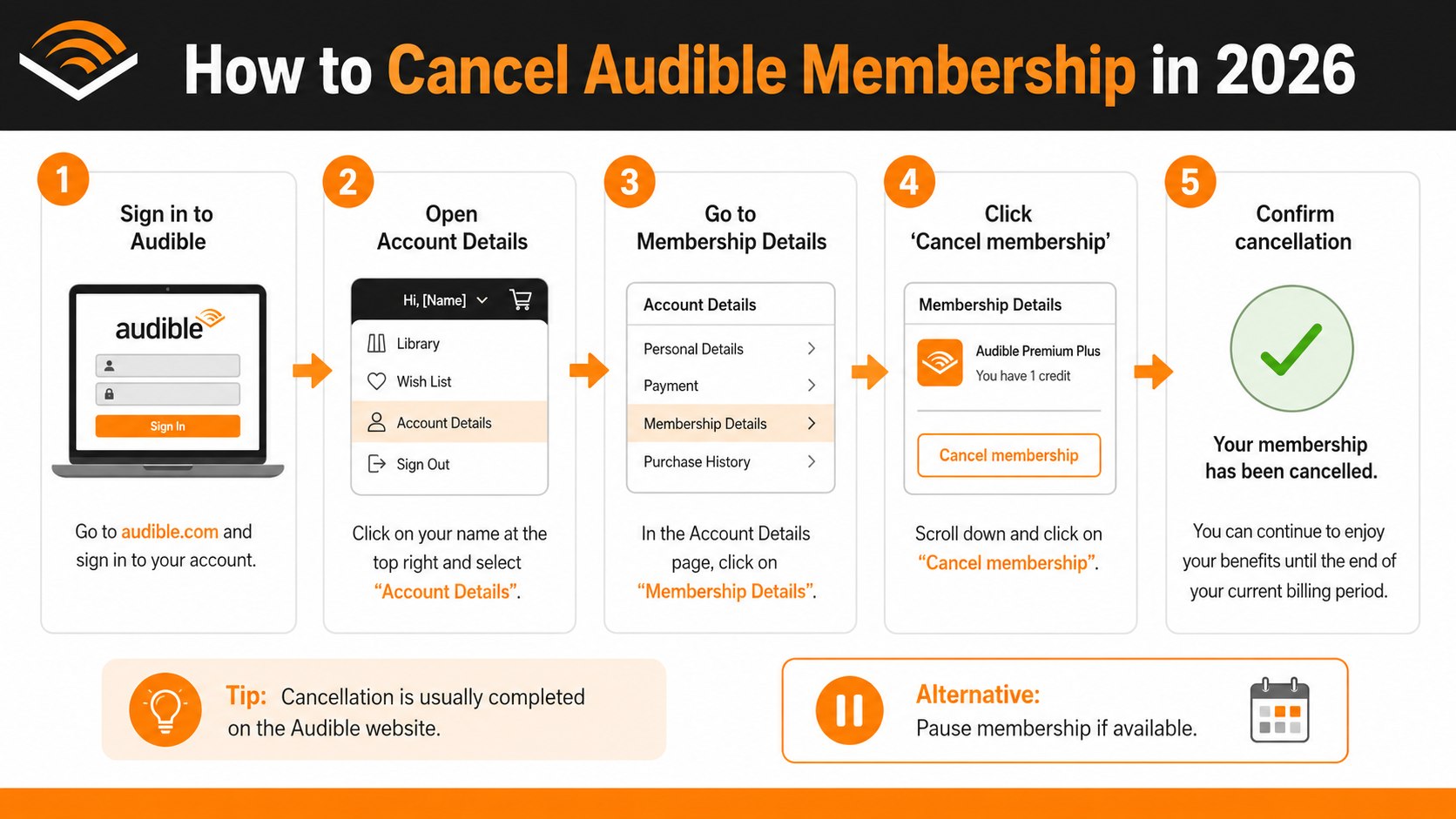
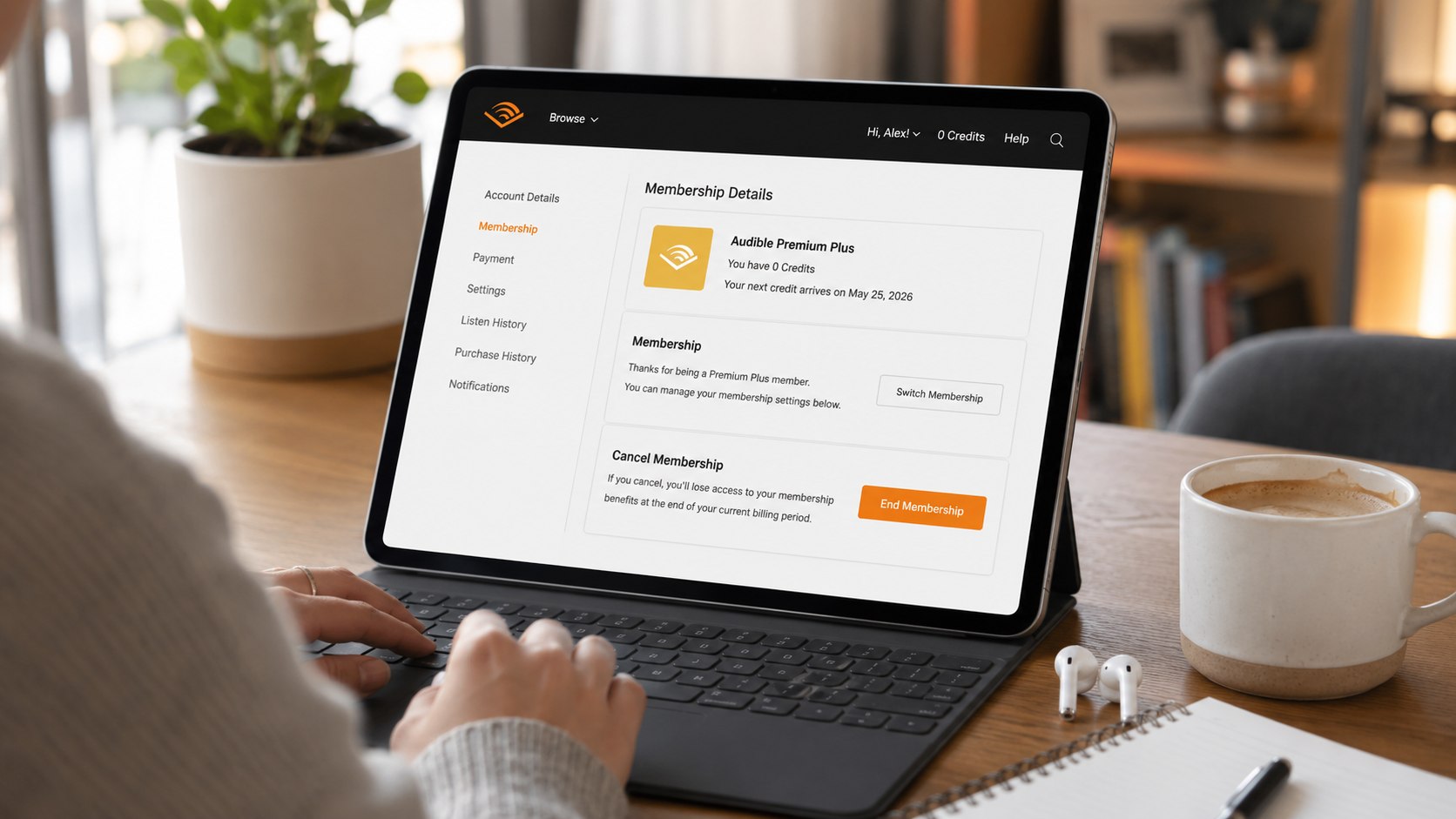
What to do: Open Audible.com in a browser, sign in, select your name, and open Account Details. Choose Cancel Membership, select a reason if requested, and continue through every confirmation screen.
Why it matters: The browser account page usually provides more complete billing controls than the Audible mobile app.
Common mistake to avoid: Do not stop after the first cancellation offer, survey, discount, or pause screen. Continue until Audible displays a final canceled status or ending date.
- Go to Audible.com and sign in.
- Open the account menu under your name.
- Select Account Details or Membership Details.
- Check the renewal date and unused credit balance.
- Select Cancel Membership.
- Review any pause or alternative-plan offer.
- Continue with cancellation if those options do not fit.
- Wait for the final confirmation page and email.
Use the same browser session until the process is complete. Opening several tabs can cause confusion about which screen contains the latest account status. A slow page or expired login may also return you to Account Details without completing the request.
After the final click, refresh the membership page. Look for wording that confirms cancellation, the final access date, or the absence of a future renewal. Do not rely only on a pop-up message.
If the account still shows an active renewal, repeat the process or contact Audible support. Keep screenshots of any error message, especially when cancellation occurs near the renewal deadline.
Step 5: Save proof and monitor the payment method
What to do: Save the cancellation email, take a screenshot of the account status, and note the cancellation date. Check the payment card after the former renewal date passes.
Why it matters: Clear records establish when the request was completed and what Audible displayed at that moment.
Common mistake to avoid: Do not delete the account or email confirmation before confirming that billing has stopped.
A screenshot should include the account name, membership status, and final renewal information. Avoid capturing a full card number or other sensitive financial details.
Pending card authorizations can appear before they settle. A pending entry is not always a completed charge, so wait until the bank identifies it as posted before opening a billing dispute. Contact Audible first when the charge appears connected to an ordinary renewal error.
For a broader household review, the Baltimore Chronicle article on canceling Apple Music in 2026 shows how subscription records should be kept when several family members share devices and payment methods.
Step 6: Request a refund or return an eligible audiobook
What to do: Contact Audible customer support promptly if a membership charge was unexpected, duplicated, or posted after a completed cancellation. Provide the charge date, amount, account email, and cancellation evidence.
Why it matters: Canceling future billing and requesting money back are separate actions. A refund is not guaranteed merely because the account has been canceled.
Common mistake to avoid: Do not describe a legitimate renewal as fraud before checking family accounts, old email addresses, and Apple or Google billing records.
Keep the request factual. State when you tried to cancel, when the charge posted, whether the membership was used afterward, and what resolution you want. A concise request gives the support representative a clearer record to review.
- Account holder’s full name
- Email address connected to Audible
- Charge date and exact USD amount
- Last 4 digits of the payment card
- Cancellation confirmation or screenshot
- Reason the charge should be reviewed
- Whether any new credit or benefit was used
Audible also has a separate process for eligible audiobook returns. Its official return guidance explains that return eligibility and the available refund method depend on the purchase and account history.
A returned title may produce a restored credit or a refund to the original payment method. That does not automatically refund the membership fee. Treat the audiobook purchase and subscription renewal as different transactions.
Audible may limit returns when it detects repeated or excessive use. The return feature is intended for legitimate problems, such as buying the wrong edition or finding that a title does not meet reasonable expectations.
Troubleshooting Audible cancellation and refund problems
Most problems come from the wrong billing provider, unused credits, incomplete confirmation screens, or an account opened under another email address. Match the symptom below with the most likely next step.
- No Cancel Membership button: Check whether Apple, Google, or another provider bills the account. Also try a desktop browser.
- Credits are still visible: Confirm whether cancellation is scheduled for the end of the billing period. Use the credits before access ends.
- A charge appeared after cancellation: Compare the charge date with the cancellation timestamp and contact Audible with the confirmation email.
- You cannot find the correct account: Search all email inboxes for Audible receipts and compare the last 4 card digits.
- A purchased book disappeared: Confirm that you signed in with the purchasing Amazon account, then contact Audible support with the receipt.
Do not create a new Audible account to solve an access problem. A second account can divide purchases across separate libraries and make billing harder to trace.
If customer support issues a refund, ask how it will appear on the statement and when it should post. Banks often need several business days to display completed credits, although timing varies by institution.
When Audible denies a request, ask for the reason in writing. Review the membership terms, the date of the cancellation evidence, and any account activity after renewal before deciding whether to contact the card issuer.
FAQ
Do I lose my Audible credits when I cancel?
Yes, unused membership credits can be lost after cancellation. Redeem them before completing the final cancellation step. Titles purchased with those credits should remain in your library.
Can I keep my audiobooks after canceling Audible?
You generally keep audiobooks purchased with cash or credits. Titles accessed only through the Plus Catalog may become unavailable when the eligible membership ends.
Can I cancel Audible through the mobile app?
The available controls depend on the device and billing provider. A browser is usually the clearest option for a membership billed directly by Audible. Apple- or Google-billed subscriptions may require cancellation through that platform.
Will Audible refund the latest membership charge?
A refund is not automatic. Contact Audible promptly with the charge date, amount, account details, and proof of cancellation. Approval depends on the circumstances and Audible’s current policies.
Does deleting the Audible app cancel the membership?
No. Removing the app only deletes it from the device. The subscription can continue renewing until it is canceled through the company managing the billing.
Can I pause Audible without losing my membership?
Eligible members may see a pause option for up to 90 days within a 12-month period. Availability and conditions can differ, so verify the offer shown in Account Details.
Earlier we wrote about UPS Lost Package Claim 2026: Documents, Deadlines and Common Errors