

If you need how to cancel youtube premium 2026, the fastest route is to open YouTube’s paid memberships page, choose your Premium plan, select “Manage membership,” then “Deactivate.” Most people can finish it in about 3 to 5 minutes, but the exact path depends on whether YouTube, Apple, Google Play, or a family manager controls the billing, аs noted by Baltimore Chronicle.
This guide covers single and family plans in the USA, including iPhone, Android, desktop, renewal timing, and what to check so the charge does not return next month. The same logic applies to other paid media accounts, including music and social subscriptions, so it is useful to review similar cancellation workflows such as How to Cancel Apple Music 2026 before cleaning up the rest of a household budget.
Key takeaways
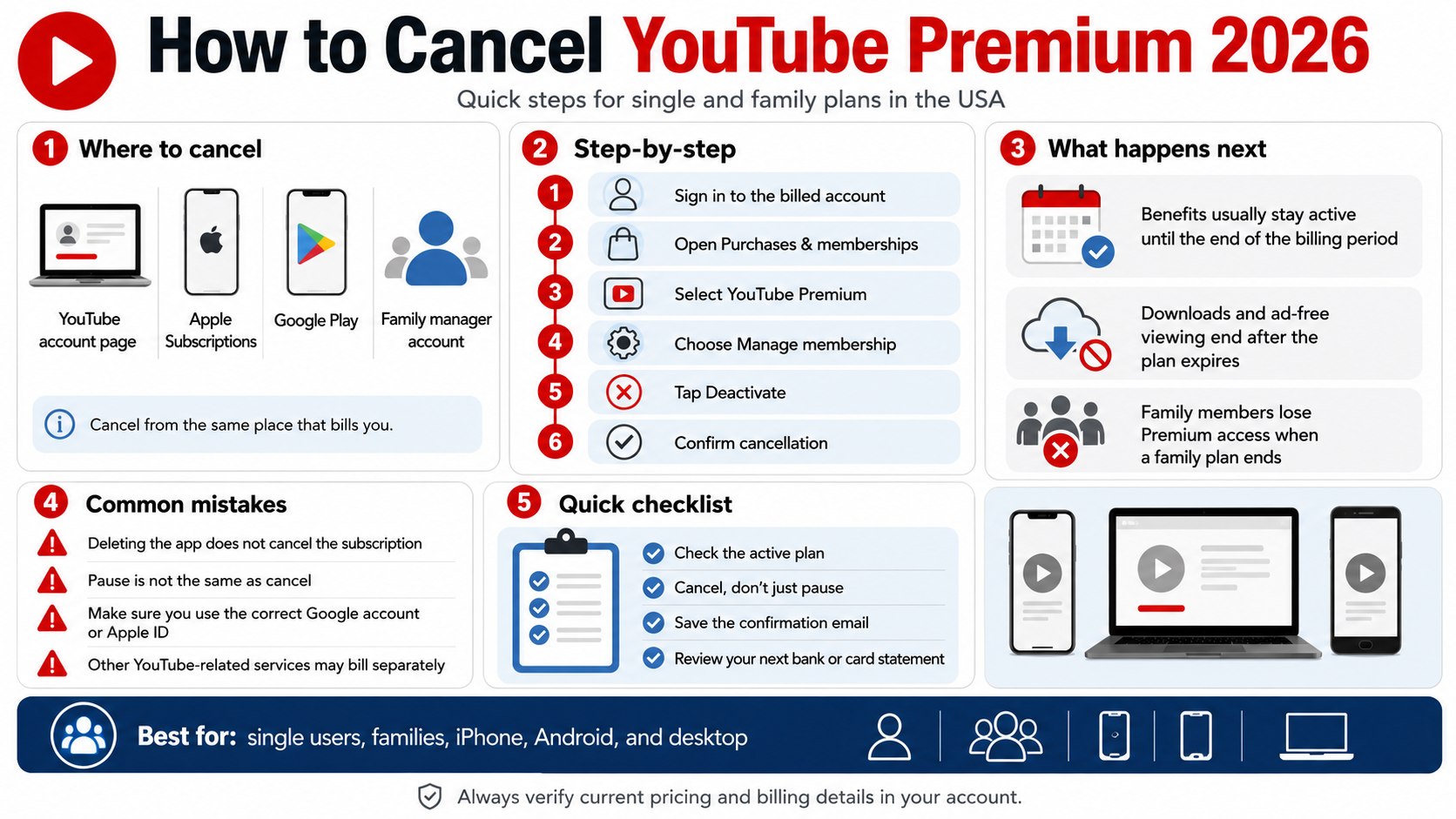
- Cancel from the same place that bills you: YouTube, Apple Subscriptions, Google Play, or your family manager’s account.
- As of 2026, YouTube lists Premium Individual at $15.99/month and Family at $26.99/month in the USA.
- Canceling usually keeps Premium benefits active until the end of the paid billing period, not instantly.
What you need
- The Google account connected to YouTube Premium.
- Access to the YouTube app, YouTube.com, Apple ID, or Google Play account.
- Your payment method or recent bank statement if the charge is hard to identify.
- About 5 minutes for a single plan or 10 minutes for a family plan.
- $0 to cancel; cancellation itself should not require a fee.
YouTube Premium is often one of several recurring digital charges on a US household statement. A family may also be paying for Apple Music, Meta paid features, cloud storage, streaming bundles, or app subscriptions, so cancellation is easier when each service is matched to the correct billing account.
Step 1: How to cancel YouTube Premium 2026 from the right account
Open YouTube while signed in to the Google account that actually has Premium. On desktop, go to YouTube’s official cancellation help page or the paid memberships page linked from your profile menu.
This matters because many US households have more than one Google account across phones, smart TVs, tablets, and shared family devices. The account watching ad-free videos may not be the account paying the bill.
The common mistake is canceling from a secondary account and assuming the subscription is gone. Check the profile photo, email address, and “Purchases and memberships” screen before tapping anything final.
Step 2: Check whether you have a single or family plan
Look at the plan name before canceling. YouTube Premium Individual, YouTube Premium Family, YouTube Music Premium, Premium Lite, and annual prepaid plans can appear in similar menus.
This matters because cancel YouTube Premium family plan decisions affect every family member tied to the household plan. As of 2026, YouTube lists Premium Family at $26.99/month in the USA and says it can include up to five family members age 13 or older in the same household.
The common mistake is removing a family member instead of canceling the plan. Removing a person stops their access, but it may not stop billing for the family manager.
| Plan type | Typical US price as of 2026 | Who can cancel | Main risk |
|---|---|---|---|
| YouTube Premium Individual | $15.99/month | The account holder | Canceling the wrong Google account |
| YouTube Premium Family | $26.99/month | The family manager | Other household members lose Premium benefits |
| YouTube Music Premium | Varies by plan and billing route | The billed account holder | Canceling music only when video Premium still bills separately |
| Annual prepaid plan | Verify in the account before purchase or renewal | The account holder | Benefits may run until the prepaid term ends |
Current plan and price details should be verified on the official YouTube Premium plans page, because account-specific offers, trials, student plans, and platform billing can change what appears at checkout. For price context, Baltimore Chronicle also covered the 2026 shift in YouTube Premium family and individual plan pricing.
Step 3: Cancel on desktop through YouTube
On a computer, go to YouTube.com, select your profile photo, open “Purchases and memberships,” choose the Premium membership, then select “Manage membership” and “Deactivate.” Follow the prompts until YouTube confirms cancellation.
This matters because desktop is often the clearest option for renters, parents, freelancers, and anyone managing several recurring charges from one screen. It also makes it easier to save a confirmation email or screenshot for your records.
The common mistake is stopping at the “Pause” offer. Pause is not the same as cancellation; it delays billing for a selected period and may resume later.
- Sign in at YouTube.com with the billed Google account.
- Open your profile menu.
- Select “Purchases and memberships.”
- Choose the active YouTube Premium membership.
- Select “Manage membership.”
- Choose “Deactivate.”
- Select cancellation instead of pause if you want billing to end.
- Save the confirmation email from YouTube.
Step 4: Cancel on iPhone if Apple bills you
If you subscribed through the YouTube iOS app, open the iPhone Settings app, tap your name, choose “Subscriptions,” select YouTube Premium, then tap “Cancel Subscription.” You may also see the subscription under your Apple ID rather than inside YouTube.
This matters because Apple-managed subscriptions usually cannot be canceled only from YouTube’s billing screen. YouTube may show the membership, but Apple controls the renewal.
The common mistake is deleting the YouTube app. Deleting an app from an iPhone does not cancel an Apple subscription, and the charge can continue under the Apple ID used at signup.
Check the email receipt if you are unsure. Apple receipts usually come from Apple and show the Apple ID, while YouTube direct billing usually sends YouTube or Google payment emails.
Step 5: Cancel on Android or Google Play
On Android, open the YouTube app, tap your profile photo, choose “Purchases and memberships,” select Premium, then manage or deactivate the membership. If Google Play handles the subscription, open the Google Play Store, tap your profile icon, choose “Payments & subscriptions,” then “Subscriptions.”
This matters because Android users may have either direct YouTube billing or Google Play subscription billing depending on how they signed up. The correct path is the one that shows the next renewal date and the active payment method.
The common mistake is switching Google accounts inside Play Store and missing the subscription. Check every Google account used on the phone if the Premium charge still appears on a card from Chase, Wells Fargo, Bank of America, Capital One, or another US issuer.
Use the billing source, not the device, as the final test. If the subscription appears under Apple, cancel in Apple. If it appears under Google Play, cancel in Google Play. If it appears under YouTube paid memberships, cancel in YouTube.
Step 6: Confirm the cancellation and protect the next bill
After you cancel YouTube Premium subscription, look for an on-screen confirmation and a cancellation email. Search your inbox for “YouTube Premium,” “Google payments,” “Apple subscription,” and the last four digits of the card that was charged.
This matters because confirmation is the proof you need if a renewal charge appears later. It also tells you when Premium benefits end, which is usually the final day of the current billing period.
The common mistake is assuming one confirmation covers every YouTube-related charge. You may still have YouTube TV, NFL Sunday Ticket, a Primetime Channel, a channel membership, Google One, or YouTube Music billed separately.
Quick cancellation checklist
- Confirm the correct Google account or Apple ID.
- Check whether the plan is Individual, Family, Music, Lite, or annual.
- Choose cancellation, not pause, if you want billing to stop.
- Save the confirmation email.
- Check the next renewal date.
- Review the next bank or card statement.
- Cancel duplicate YouTube-related memberships if they appear separately.
Step 7: Handle family members, downloads, and saved content
For a family plan, the family manager should tell household members before cancellation. Parents may want to download receipts, check YouTube Kids habits, and decide whether one adult should keep an individual plan instead.
This matters because family cancellation removes Premium benefits from everyone on the plan after the paid period ends. That means ads return, background play ends, and offline downloads may stop working.
The common mistake is canceling a family plan to save money, then having two or three household members sign up for separate individual plans. At 2026 US list prices, two individual plans can cost more than one family plan.
| Household situation | Better move | Reason |
|---|---|---|
| One person uses Premium | Cancel Family and keep or restart Individual only if needed | The family plan price is hard to justify for one user |
| Two or more heavy users in one household | Compare Family against separate Individual plans | The family plan may still be cheaper at current US prices |
| Temporary budget cut | Consider pause only if offered and useful | Pause can prevent an accidental permanent switch |
| Child account depends on ad-free viewing | Review YouTube Kids and parental settings first | Cancellation changes the viewing experience after the billing period |
Families that are cutting YouTube Premium often review other paid accounts at the same time. Baltimore Chronicle’s guide to Meta Plus subscriptions across Instagram, Facebook and WhatsApp is relevant for households that want to separate useful services from background renewals.
Troubleshooting YouTube Premium cancellation problems
- stop YouTube Premium billing: If billing continues, check Apple Subscriptions, Google Play, and every Google account on the device before contacting support.
- turn off YouTube Premium renewal: If you only see “Pause,” continue through the deactivation flow until the cancellation option appears.
- YouTube Premium refund request: If a charge posted after cancellation, use the billing platform that charged you. Apple, Google Play, and YouTube direct billing have different review paths.
- cancel YouTube Premium on iPhone: If the YouTube app does not show cancellation, use iPhone Settings, then your Apple ID, then Subscriptions.
- cancel YouTube Premium on Android: If the YouTube app does not show the active plan, check Google Play subscriptions under the same Google account used for purchase.
Another issue is account confusion. A spouse, roommate, teenager, or older family Google account may be the family manager even if another person uses Premium the most.
Bank statements can help identify the billing route. “Google,” “YouTube,” “Apple,” or “Google Play” in the merchant line usually points to where the cancellation must happen.
FAQ
Can I cancel YouTube Premium and keep it until the end of the month?
In most cases, yes. Canceling usually stops the next renewal while keeping Premium benefits active until the end of the paid billing period shown in your account.
Does deleting the YouTube app cancel Premium?
No. Deleting the app does not cancel a paid subscription. You must cancel through YouTube paid memberships, Apple Subscriptions, or Google Play, depending on who bills you.
Who cancels a YouTube Premium Family plan?
The family manager normally controls the paid family membership. Other members can leave the family group, but that does not necessarily stop the monthly family plan charge.
Can I pause instead of canceling YouTube Premium?
Some accounts may see a pause option during the deactivation flow. Pause can be useful for a temporary break, but cancellation is the better choice when the goal is to end renewal billing.
Why am I still being charged after cancellation?
The most common reasons are canceling the wrong account, having Apple or Google Play billing instead of direct YouTube billing, or having a separate YouTube-related subscription still active.
What is the safest way to verify cancellation?
Save the cancellation email, check the membership page for the end date, and review the next card or bank statement. If a new charge appears, use the merchant name to identify the billing platform.
Earlier we wrote about How to Find a Reliable Home Builder in 2026: References, Contracts, Costs