


How to cancel Walmart Plus 2026 takes about 5 minutes when the membership is billed directly by Walmart. Sign in, open Walmart+, choose Manage Membership, select Cancel, then confirm the request. Cancel before the renewal date to prevent another $12.95 monthly or $98 annual charge. That distinction matters because Walmart says standard Walmart+ membership payments are not refundable, as noted by the Baltimore Chronicle editorial team.
Deleting the Walmart app does not cancel the subscription. Removing a payment card is also not a reliable substitute. The account must show that the membership is canceled or will not renew.
Key takeaways before canceling Walmart Plus
- Cancel before your renewal date because Walmart+ automatically renews monthly or annually unless the membership is stopped.
- Walmart says ordinary Walmart+ membership charges are nonrefundable, so cancellation normally prevents the next charge instead.
- After cancellation, paid benefits remain available through the end of the current membership term.
The timing is more important than the amount of time needed to click through the cancellation screens. Someone canceling several days before renewal has room to resolve account problems. Someone canceling after a $98 annual renewal faces a different problem. The subscription can still be stopped, but the completed renewal charge normally stays in place. Keep the final confirmation until the former renewal date passes without another payment.
“We’re not able to offer refunds on Walmart+.”
Walmart Help Center, Walmart+ Billing and Payments, current policy reviewed for 2026.
What you need before starting
Gather the basic account information first. It prevents a simple cancellation from turning into a search through old email addresses and payment accounts.
- The email address or phone number connected to your Walmart account
- Your Walmart password or account recovery access
- A recent card or PayPal statement showing the recurring charge
- Your Walmart+ renewal date
- A phone or computer with access to Walmart.com
- About 5 to 10 minutes
A recent statement is useful when more than 1 person uses Walmart in the household. Confirm which account owns the paid membership before changing anything. Also check whether InHome or another paid Plus Up appears alongside Walmart+. Those services can have separate charges and cancellation controls. A screenshot of the final confirmation can provide evidence if billing continues later.
Readers reviewing several recurring payments can use the same method described in Baltimore Chronicle’s DashPass cancellation guide. Identify the biller, stop renewal, and save proof rather than simply deleting an app.
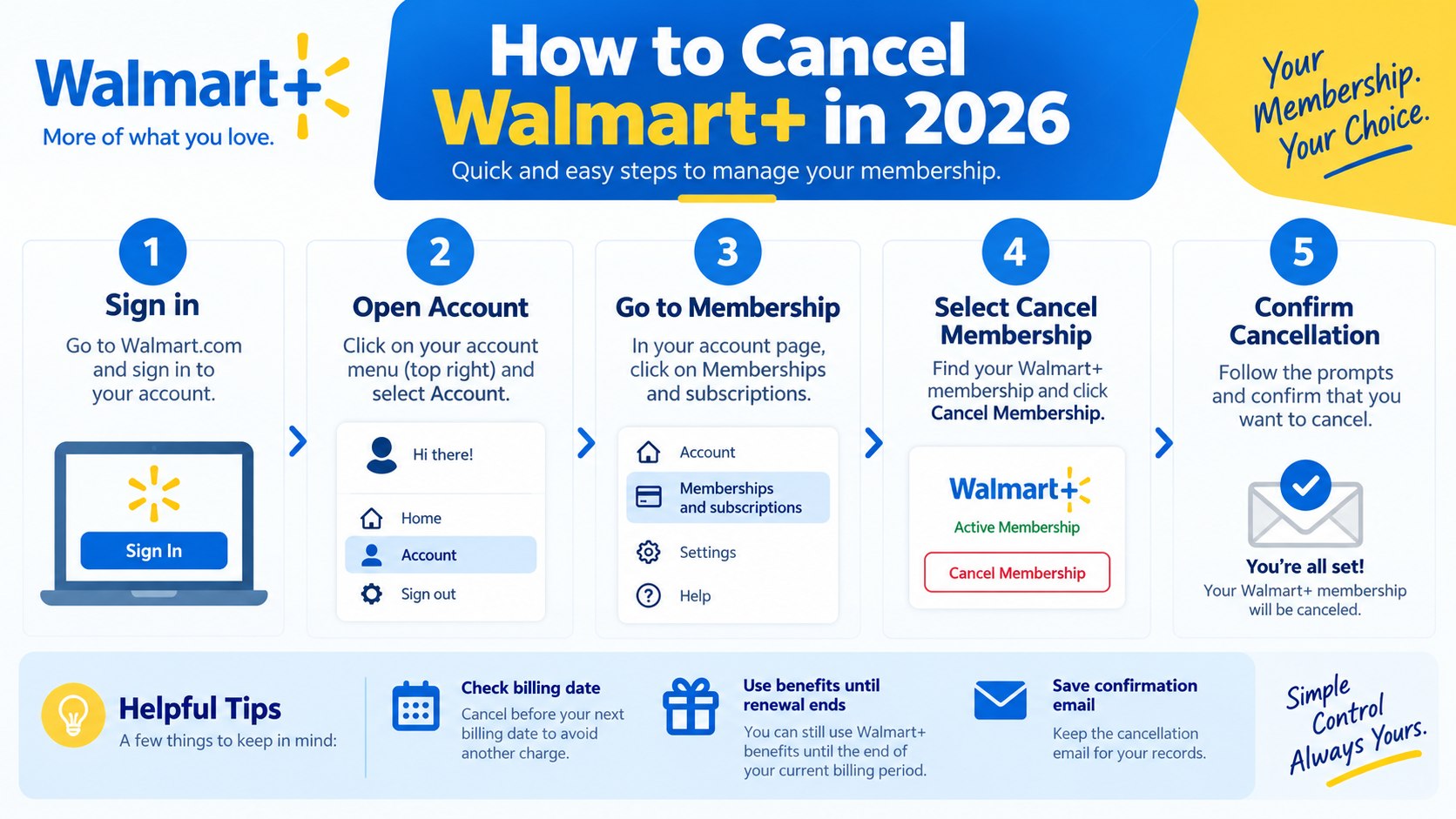
Step 1: Check your Walmart Plus renewal date
Sign in to Walmart.com and open Account, then Walmart+. Review the membership plan and next billing date before selecting any cancellation option.
This matters because Walmart+ uses automatic renewal. As of 2026, the standard plan costs $12.95 monthly or $98 annually, plus applicable tax. The annual plan equals about $8.17 monthly when divided across 12 months.
Stopping the next renewal and requesting money back for a completed renewal are separate issues.
The common mistake is assuming cancellation will reverse a payment that already processed. In most cases, cancellation affects the next renewal rather than a past charge.
Step 2: Open Manage Membership in your account
From the Walmart+ page, select Manage Membership. Walmart’s official membership management instructions place cancellation controls inside this section.
Choose Manage beside the Walmart+ plan. Then locate Cancel beside the cancellation option. The interface may also show alternatives, including a pause or reminder before renewal.
Why it matters: a retention option is not the same as permanent cancellation. A common mistake is choosing “Remind Me Later” and assuming renewal has already stopped.
That same distinction appears with newspaper subscriptions. Baltimore Chronicle’s guide on canceling a New York Times subscription explains why the final account status matters more than the first cancellation button.
Step 3: Select Cancel and complete every confirmation
Choose Cancel Membership and continue until Walmart presents the final confirmation choice. Walmart currently lists options including confirming cancellation, keeping membership, or viewing another offer.
Select the option that explicitly confirms cancellation. Do not leave the page after only selecting a reason or opening an offer.
This step determines whether cancel Walmart Plus membership becomes an actual account change. The common mistake is closing the browser before Walmart records the final request.
| Account status | What it means | What to do |
|---|---|---|
| Active with renewal date | Automatic billing remains scheduled | Complete cancellation |
| Canceled or ending on a date | Renewal has been stopped | Save confirmation |
| Paused | Billing and benefits temporarily stop | Remember that membership resumes |
| Payment failed | Cancellation is not necessarily complete | Check membership status directly |
A failed card charge is not the same as a canceled subscription. Walmart can retry eligible payment methods stored in an account. A paused membership is also temporary rather than permanent. Walmart currently allows qualifying paid members to pause for 1 month at a time, up to 3 times within 12 months. The membership then resumes automatically unless another action changes it.
Step 4: Save proof that auto-renewal stopped
After confirmation, check the Walmart+ account page again. Look for an expiration date, canceled status, or another indication that renewal has stopped.
Save a screenshot and any confirmation email. This evidence becomes useful if a charge appears around the former renewal date.
The reason is simple: Walmart Plus auto renewal continues until cancellation is completed before the current term ends. Walmart’s current terms state that members retain benefits until that term expires.
“To avoid being charged for a new Walmart+ membership term, you must cancel your membership before the end of the current membership term.”
Walmart, Walmart+ Terms of Use, auto-renewal provision applicable in 2026.
Do not immediately delete every Walmart email after cancellation. Keep the confirmation through at least the former renewal date. Record the date when access should end. That small paper trail is more useful than trying to remember which buttons appeared several weeks earlier.
Step 5: Check whether you should cancel or pause instead
Permanent cancellation makes sense when the benefits no longer justify the recurring price. A pause can make more sense during a short period when Walmart+ will not be used.
A pause is a billing break, not an escape from auto-renewal. The membership resumes after the pause period under Walmart’s current rules.
The practical difference is clearer when the options are compared directly.
| Option | Billing effect | Benefits | Best fit |
|---|---|---|---|
| Cancel | Stops future renewal | Continue until current term ends | Membership is no longer needed |
| Pause | Temporarily stops billing | Unavailable during pause | Short break from the service |
| Keep membership | Renews automatically | Continue normally | Benefits still justify the cost |
Pausing deserves caution because Walmart limits eligibility. Trial memberships and some accounts with paid Plus Up benefits may not qualify. A pause can last 1 month and later resumes automatically. That means someone trying to eliminate recurring expenses should choose cancellation instead. Review every attached paid benefit separately before leaving the account page.
Step 6: Handle refunds, recent charges and cancellation problems
The hardest part of how to stop Walmart Plus recurring charges is often a renewal that has already posted. Walmart’s published 2026 billing guidance says Walmart+ refunds are not offered under the standard policy.
That means canceling immediately after a $98 annual renewal does not automatically create a $98 refund. The membership generally remains available through the paid term after cancellation.
Review the charge carefully before treating it as an error. Walmart+ base membership, InHome, and other paid additions can appear as separate transactions.
Troubleshooting common Walmart Plus cancellation problems
- Cancel option is missing: verify that the correct Walmart account owns the membership.
- A charge appeared after cancellation: compare the transaction date with the cancellation and renewal dates.
- The app will not open: use Walmart.com in a browser or contact Walmart Customer Care.
- You do not recognize the charge: treat it as a possible unauthorized transaction rather than a normal cancellation.
- Another Walmart service still bills you: check InHome and other Plus Up products separately.
Do not begin by disputing a normal renewal simply because the membership was forgotten. First establish whether cancellation happened before or after the billing date. If the account shows a confirmed cancellation before a later completed charge, preserve the evidence. Contact Walmart Customer Care and the card issuer when appropriate. Unauthorized charges should be handled separately from ordinary subscription cancellations.
Walmart lists Customer Care at 800-924-9206 in its Walmart+ Terms of Use. Consumers with recurring-billing disputes can also contact their card issuer or state attorney general. California and New York residents may also have state-level automatic-renewal protections.
Anyone cleaning up several household subscriptions may also find Baltimore Chronicle’s Washington Post cancellation guide useful. The underlying rule stays consistent: determine who processes payment before trying to stop it.

Walmart Plus cancellation details for 2026
The current pricing makes the timing difference easy to quantify. A monthly member risks another $12.95 charge plus tax by missing renewal. An annual member risks another $98 charge plus tax.
- Check the renewal date before changing the account.
- Open Walmart+ and select Manage Membership.
- Select Manage beside the active Walmart+ plan.
- Choose Cancel Membership.
- Confirm cancellation through the final screen.
- Save the confirmation and check the account status.
- Monitor the payment account after the former renewal date.
These steps address how to cancel Walmart Plus online without relying on a failed payment or deleted app. They also preserve a record if something goes wrong. The process should normally take only several minutes when the correct account is available. Household members using shared devices should confirm the email address before making changes. The most important result is a clear non-renewing or canceled status.
FAQ about canceling Walmart Plus in 2026
Can I cancel Walmart Plus online in 2026?
Yes. Sign in, open Walmart+, select Manage Membership, manage the Walmart+ plan, and choose Cancel. Continue until the account confirms cancellation.
Will Walmart refund my Walmart Plus membership?
Walmart’s published billing policy says standard Walmart+ membership payments are not refundable. Canceling usually prevents the next renewal instead of reversing the current charge.
Does canceling Walmart Plus end the benefits immediately?
No. Walmart’s terms state that members can continue using benefits through the end of the current paid membership term.
How much does Walmart Plus cost in 2026?
The standard membership costs $12.95 per month or $98 per year, plus applicable tax. Eligible Walmart+ Assist and Student plans can have lower pricing.
Can I pause Walmart Plus instead of canceling?
Eligible paid members can pause Walmart+ for 1 month at a time, up to 3 times within 12 months. The membership resumes automatically afterward.
Does deleting the Walmart app cancel Walmart Plus?
No. Deleting the app does not terminate the billing agreement. Cancellation must be completed through the membership controls or Walmart Customer Care.
Earlier we wrote about How to Remove Someone from a Mortgage in USA in 2026 Without Making a Costly Title Mistake