

How to track a UPS package by reference number takes about 3–5 minutes when the sender connected a valid reference to the shipment. Open the official UPS tracking service, choose reference-number tracking, and enter the code, shipping dates, destination country, and ZIP code. You can use this method without the usual UPS tracking number beginning with “1Z,” as noted by the Baltimore Chronicle.
A reference number may be an order number, invoice number, purchase order, customer ID, or another code created by the sender. It works only when that code was added while the shipping label was prepared. If UPS finds nothing, verify the reference, widen the shipping-date range, and confirm the destination ZIP code before contacting the merchant.
Key takeaways
- A UPS reference number comes from the sender and differs from the carrier-generated tracking number.
- The shipment date, destination country, and ZIP code help UPS identify the correct package.
- If the search fails, request the 1Z number or check eligible deliveries through UPS My Choice.
What you need before tracking the package
You do not need special software or a paid tracking service. In most cases, a phone or computer and several shipment details are enough.
- The sender’s reference, order, invoice, or purchase order number
- The estimated date when the package was shipped
- The destination country
- The destination ZIP code
- Access to the official UPS website
- About 3–5 minutes
Check your order confirmation, store account, invoice, dispatch message, or printed receipt. The visible retail order number may also be the shipment reference, but that is not guaranteed. Keep all letters, digits, hyphens, and leading zeros exactly as shown. A single incorrect character can prevent UPS from finding the record.
Do not use a bank transaction number unless the merchant specifically says it was assigned as the shipment reference. Payment processors, retailers, and delivery companies maintain separate identification systems.
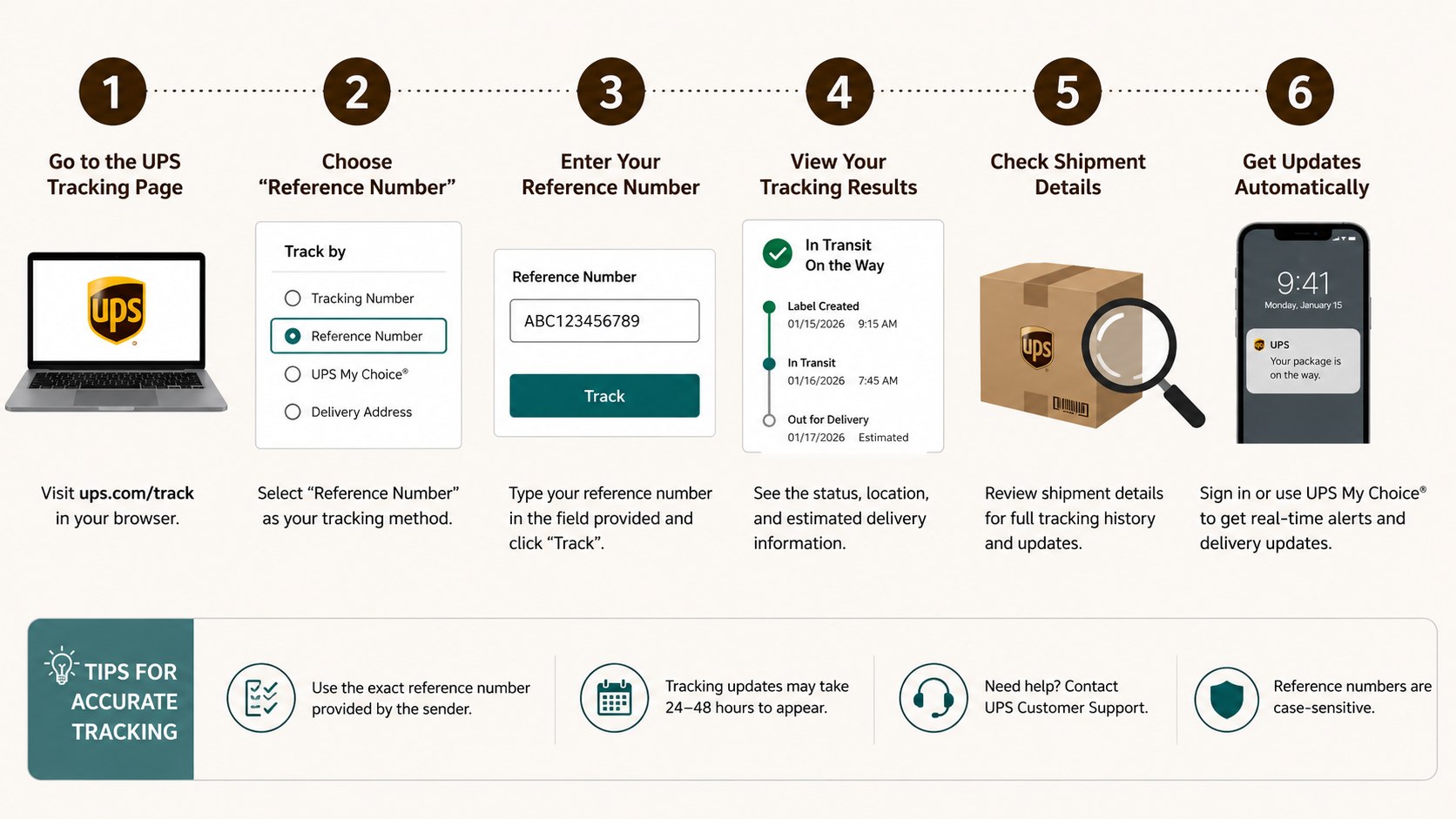
Step 1: Confirm that the code is a shipment reference
Locate the code provided by the retailer, warehouse, employer, marketplace seller, or private sender. It may appear beside labels such as “Order Number,” “PO Number,” “Invoice,” or “Shipment Reference.”
Why it matters: UPS can search only references submitted with the shipping data. A code used exclusively inside the retailer’s sales system will not appear in UPS records.
A common mistake is confusing a reference number with a payment authorization code. Another is adding “1Z” to an ordinary order number. That prefix does not convert a merchant reference into a UPS tracking number.
Step 2: Open the official UPS tracking service
Go to the official UPS tracking page. Find the option for tracking by reference number or shipment reference.
Why it matters: third-party parcel websites may show delayed information or request unnecessary personal data. The official UPS system displays carrier records directly.
UPS reference number tracking is free. Do not enter credit card information merely to view a shipment status. A basic tracking search should not require payment, a Social Security number, or an unrelated identity document.
Step 3: Enter the reference exactly as supplied
Type or paste the complete reference into the designated field. The format depends on the shipper and may contain letters, numbers, spaces, hyphens, or other permitted characters.
Why it matters: businesses may process thousands of shipments with similar order codes. Exact entry reduces the risk of receiving no result or opening the wrong record.
Check characters that are easily confused. The letter “O” may resemble the digit “0,” while uppercase “I” can look like “1.” Remove accidental spaces copied from an email, but preserve spaces that clearly belong to the reference.
Step 4: Choose an accurate shipment date range
Enter the likely date when the label was created or the package was handed to UPS. Begin with a short range around the shipping confirmation date.
Why it matters: some companies reuse customer numbers, invoice sequences, or purchase order references. A date range helps UPS isolate the current shipment.
Do not use only the expected delivery date. A label might have been created several days before delivery. Orders placed late Friday may not receive a physical UPS scan until Monday, especially when the sender does not offer weekend pickup.
If the initial search produces nothing, expand the range by 2–3 days on each side. Avoid choosing an unnecessarily broad period because it may return several shipments associated with the same reference.
Step 5: Add the destination country and ZIP code
Select the United States for a domestic shipment. Enter the ZIP code used on the shipping label when UPS requests destination information.
Why it matters: the destination helps distinguish packages sharing the same order or customer reference. It also limits access to detailed shipment records.
Use the delivery ZIP code, not your current physical location. A package sent to an office in Washington, D.C., should not be searched with a residential Maryland or Virginia ZIP code.
Recent movers should check which address was active during checkout. USPS forwarding does not automatically redirect every UPS package. Baltimore Chronicle explains the separate postal process in its guide to signing up for USPS Informed Delivery in 2026, which can help households monitor eligible mail and USPS packages connected to a verified address.
Step 6: Review the matching UPS shipment
Select the tracking button and examine the returned record. Compare the shipment date, destination, service level, delivery estimate, and latest scan with your order details.
Why it matters: a broad or repeatedly used reference may identify several packages. Selecting the wrong shipment could make you believe your order was delivered, delayed, or sent to another city.
Do not assume the latest scan city is the destination. UPS packages often move through regional hubs before reaching a local facility. A scan in Louisville, Kentucky, Hodgkins, Illinois, or another major logistics center can be part of a normal route.
The following statuses can help you decide what to do next:
| UPS status | What it usually means | Recommended action |
|---|---|---|
| Label Created | The sender transmitted shipping data, but UPS may not possess the parcel | Allow time for the first physical scan or contact the sender |
| On the Way | UPS has the package and it is moving through the network | Monitor later scans and the revised delivery estimate |
| Out for Delivery | The parcel was assigned to a local delivery route | Prepare for delivery and check whether a signature is required |
| Exception | Weather, address problems, damage, or another event affected delivery | Open the detailed message and follow the listed instructions |
| Delivered | UPS recorded delivery to the address or an authorized location | Check delivery photos, entrances, parcel rooms, and household members |
“Label Created” does not confirm that UPS has physically received the box. The merchant may have printed the label while the order remained inside a warehouse. “On the Way” confirms movement, but the scheduled date can still change after weather or operational delays.
An exception does not always mean the package is lost. Read the accompanying message before calling support. When the record says “Delivered,” inspect porches, garages, side doors, apartment mailrooms, reception desks, and authorized pickup locations.
Step 7: Save the UPS tracking number
When the reference search identifies the shipment, copy the carrier-generated tracking number from the result. Save it in your email, order account, notes app, or delivery folder.
Why it matters: a regular UPS tracking number is more precise. It is also easier to use for alerts, customer service, proof of delivery, and possible claims.
Most standard UPS tracking numbers begin with “1Z” and contain 18 characters. Other UPS services can use different formats, so do not reject a result solely because the identifier looks unfamiliar.
Avoid posting the complete number on social media or public forums. Shipment details may reveal delivery timing, general location information, pickup points, or partial recipient data.
Step 8: Use UPS My Choice for future deliveries
Create or sign in to a UPS My Choice account if you receive packages regularly. Eligible shipments connected to your verified address may appear automatically.
Why it matters: My Choice can provide delivery notifications and incoming-package visibility even when a retailer sends an incomplete tracking email.
The recipient name and address must match closely enough for UPS to associate the package with the account. An omitted apartment number, old surname, business name, or recently changed address may prevent automatic matching.
UPS offers free tracking features, while certain delivery changes or premium options may involve restrictions or charges in 2026. Review the displayed price and conditions before approving any paid request.
UPS reference tracking versus other options
Tracking a UPS package without a tracking number is possible through several routes. The best method depends on whether you have a reference, an attempted-delivery notice, an online account, or access to the sender.
| Tracking method | Best use | Main limitation |
| Shipment reference | Retail orders, invoices, purchase orders, and business shipments | The sender must attach the reference to UPS shipping data |
| UPS tracking number | Tracking one specific parcel | You need the carrier-generated identifier |
| UPS My Choice | Incoming residential packages connected to an address | Name and address matching can affect visibility |
| UPS InfoNotice | Packages after a delivery attempt | The notice exists only after the driver visits |
| Retailer account | Amazon, Walmart, Target, eBay, Etsy, and other purchases | The retailer’s updates may appear later than carrier scans |
Reference tracking works well for companies with structured order systems. The standard tracking number remains the most accurate method because it identifies one UPS shipment directly.
UPS My Choice is practical for renters, homeowners, parents, and freelancers who receive frequent deliveries. An InfoNotice is useful only after an attempted delivery, while a retailer account may explain split shipments or seller-side delays.
Carrier systems are not interchangeable. A UPS reference normally cannot be used as a USPS tracking number. For postal shipments, see Baltimore Chronicle’s guide on how to track a USPS package without a tracking number.
Troubleshooting UPS reference tracking
Most unsuccessful searches involve an incorrect identifier, date range, destination, or carrier. Check these common situations before assuming the package has disappeared.
- No shipment appears: verify every character, remove accidental spaces, and widen the shipping dates.
- Several shipments appear: enter the destination ZIP code and use a shorter date range.
- The merchant says it shipped: request the carrier-generated 1Z number or a screenshot of the UPS record.
- The status remains “Label Created”: contact the merchant because UPS may not possess the package.
- The parcel says “Delivered”: inspect safe locations, delivery photos, neighbors, parcel lockers, and building staff.
A failed search does not prove that the shipment was never prepared. The seller may have entered a customer ID, warehouse code, or invoice number that differs from the order number visible to you.
One order may also be divided into several packages. Each box can receive a separate UPS tracking number, even when every parcel shares one purchase order or customer reference.
Confirm the actual carrier before repeating the search. UPS, USPS, FedEx, DHL, Amazon Logistics, and regional couriers maintain separate tracking systems. Some merchants also transfer parcels between carriers during the final delivery stage.
If a shipment entered the USPS network and then stopped updating, Baltimore Chronicle provides instructions for filing a USPS Missing Mail Search in 2026. For packages remaining inside the UPS network, contact the sender and request the full UPS tracking number.
FAQ
Can I track a UPS package using an order number?
Yes, when the sender entered that order number as a UPS shipment reference. If it exists only inside the merchant’s sales system, UPS will not recognize it.
Is a UPS reference number the same as a tracking number?
No. The sender creates the reference, while UPS generates the tracking number. The reference may identify an order, invoice, customer, department, or purchase order.
Can I track a UPS package by address?
UPS does not provide a public address-only search. UPS My Choice may display eligible packages linked to a verified recipient name and delivery address.
Why is my UPS reference number not working?
The sender may not have submitted it to UPS. Other causes include typing errors, an incorrect date range, the wrong ZIP code, or using an internal merchant number.
Can several UPS packages share one reference?
Yes. A business may apply one customer number or purchase order to several boxes. Use the shipment dates and destination ZIP code to narrow the results.
Does UPS charge for reference-number tracking?
Basic tracking on UPS.com costs $0. Optional delivery changes or premium account features may carry fees, which UPS should display before confirmation.
Earlier we wrote about How to Silence Unknown Callers iPhone 2026 Without Blocking Important Contacts