

How to cancel Apple Arcade 2026 takes about 2 minutes through your Apple Account subscription settings. Cancel before the renewal date, confirm the expiration message, and request a refund separately when a recent charge appears incorrect, as Baltimore Chronicle reports.
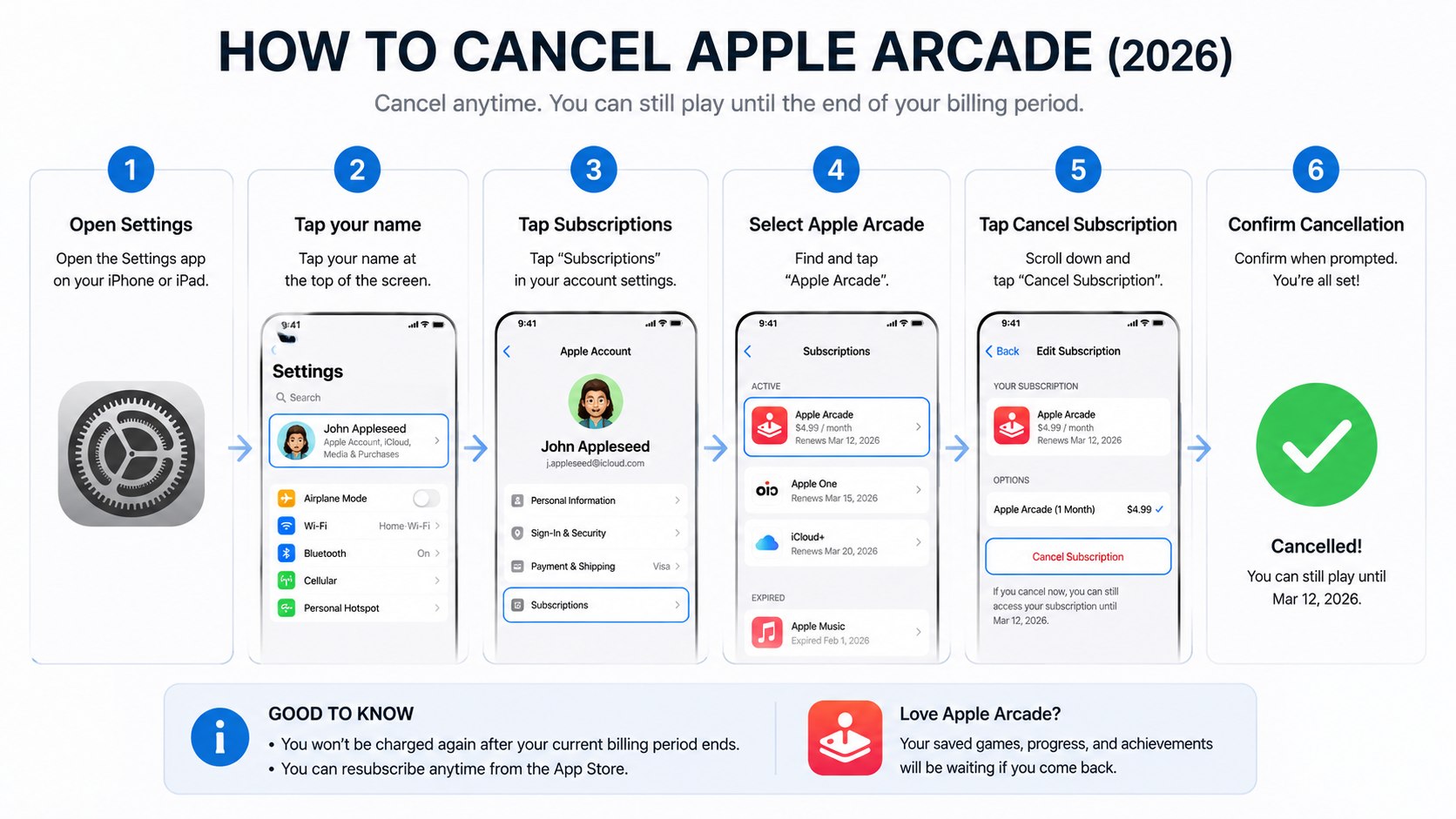
On an iPhone or iPad, open Settings, tap your name, select Subscriptions, choose Apple Arcade, and tap Cancel Subscription. Removing games or deleting an Arcade app does not stop billing.
Key takeaways
- Cancel through the Apple Account that originally purchased Apple Arcade, not through an individual game.
- Your access usually continues until the displayed expiration date after a paid plan is canceled.
- Cancellation prevents another charge, but a refund requires a separate request and Apple’s approval.
What you need before canceling Apple Arcade
You do not need receipts, printed documents, or a call with customer service for a standard cancellation. You need access to the Apple Account responsible for the subscription and about 2 minutes.
- An iPhone, iPad, Mac, Apple TV, Windows PC, or web browser
- The email address or phone number linked to your Apple Account
- Your device passcode, password, Face ID, or Touch ID
- Access to the payment account if you need to confirm a charge
- The latest billing date when you plan to request a refund
Check which family member controls the subscription before making changes. Apple Arcade supports Family Sharing with up to 5 additional family members, but only the organizer or purchasing account may see the billing controls.
As of 2026, Apple lists Apple Arcade at $6.99 per month or $49.99 per year in the United States. It can also be included within an Apple One bundle. Canceling one service inside a bundle may require changing the entire Apple One plan instead of removing Arcade alone.
Before proceeding, note the renewal date shown beside the subscription. A cancellation made after processing begins may not prevent the next charge.
Step 1: Open your Apple subscription settings
On an iPhone or iPad, open Settings and tap your name at the top. Select Subscriptions to view recurring services billed through that Apple Account.
This screen separates active subscriptions from expired plans. It also shows whether Apple Arcade was purchased directly or included through Apple One.
A common mistake is opening App Store purchase history instead. Purchase history lists charges, but it is not the main cancellation menu.
Step 2: Select Apple Arcade or Apple One
Tap Apple Arcade under Active subscriptions. When Arcade comes through Apple One, select Apple One and review the available plan controls.
This distinction matters because canceling Apple One can affect Apple Music, Apple TV, iCloud storage, and other included services. Review every service before confirming a bundle change.
Do not assume Arcade is billed separately because its games appear independently. The payment arrangement controls the cancellation method.
Step 3: Tap Cancel Subscription and confirm
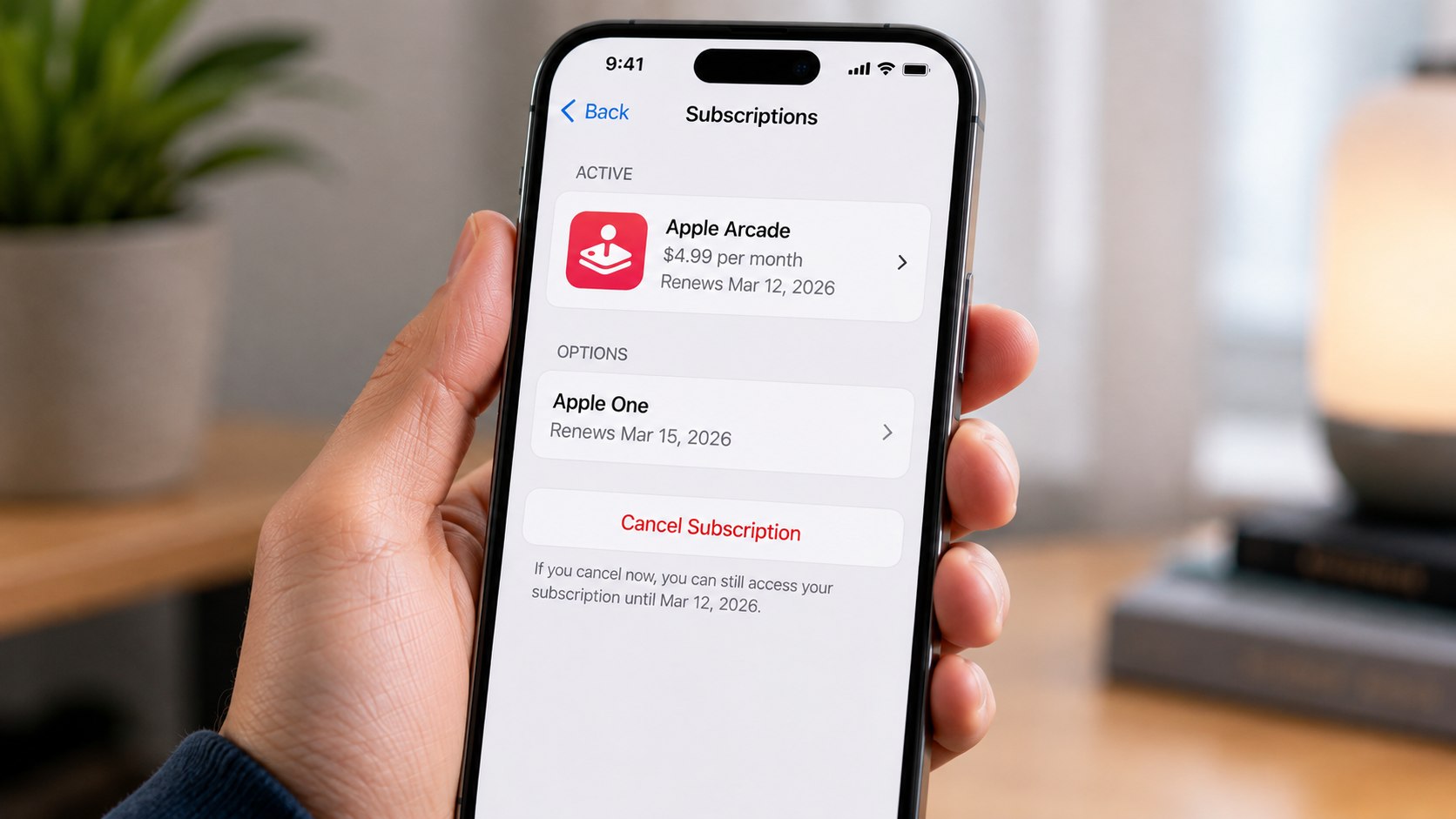
Scroll down and tap Cancel Subscription or Cancel Free Trial. Follow the confirmation prompt until the screen displays an expiration date or canceled status.
This action turns off automatic renewal. It does not delete downloaded games, saved data, or your Apple Account.
The most frequent mistake is closing Settings before confirmation appears. Reopen the subscription page and verify the final access date.
“If there is no Cancel button or you see an expiry message, the subscription has already been cancelled.”
Apple Support, subscription cancellation guidance, updated June 26, 2026.
Apple’s official cancellation instructions cover iPhone, iPad, Mac, Windows devices, Apple Vision Pro, and web-based account management. The company advises users to locate the subscription under the purchasing Apple Account.
Step 4: Cancel Apple Arcade on a Mac
Open the App Store on your Mac and click your name in the lower-left corner. Select Account Settings, scroll to Subscriptions, and click Manage.
Find Apple Arcade or Apple One, select Edit, and choose Cancel Subscription. Authenticate again when macOS requests your Apple Account password.
This method is useful when an iPhone is unavailable or managed by an employer. Avoid signing into a different App Store account, since the subscription may not appear.
Readers reviewing several recurring services can also use our guide to cancel Apple Music in 2026. The same account menu controls many subscriptions purchased through Apple.
Step 5: Cancel through Apple TV or a web browser
On Apple TV, open Settings and select Users and Accounts. Choose the relevant user, open Subscriptions, select Apple Arcade, and turn off renewal.
For browser access, sign into Apple’s subscription management page using the Apple Account that receives the charge. Select Apple Arcade and follow the cancellation controls.
This option helps renters, parents, and travelers who cannot reach their usual device. Never enter credentials through a link received in an unexpected text or email.
If several entertainment services need review, Baltimore Chronicle also explains how to cancel a Hulu subscription when Apple handles the billing.
Step 6: Verify the end date and save proof
Return to Settings, select your name, and open Subscriptions again. Apple Arcade should show an expiration date rather than an upcoming renewal date.
Take a screenshot when the timing is important. Keep any cancellation email until the final billing period passes.
This evidence can help when several family members share one payment card. A common mistake is treating a removed payment method as proof of cancellation.
Canceling a paid subscription usually stops the next renewal while preserving access through the current period. Trial access may end sooner, depending on the offer.
How to cancel Apple Arcade 2026 without losing track of billing
The result depends on how the subscription was purchased. The following comparison helps identify the correct account and expected outcome.
| Subscription setup | Where to cancel | What to check | Likely result |
|---|---|---|---|
| Monthly Apple Arcade | Apple Account Subscriptions | Next renewal date | Access usually continues until expiration |
| Annual Apple Arcade | Apple Account Subscriptions | Annual billing date | No renewal after the paid term |
| Free trial | Apple Account Subscriptions | Trial expiration terms | Access may end when canceled |
| Apple One bundle | Apple One plan settings | Other bundled services | Plan changes may affect several services |
| Family Sharing | Organizer or purchasing account | Who receives the receipt | Shared access ends with the paid plan |
The receipt email provides the strongest clue when the subscription is missing. Search your inbox for “Apple Arcade,” “receipt from Apple,” or the latest charged amount.
Also inspect the transaction description on your card or bank account. Apple purchases may appear as an aggregated Apple charge rather than a line labeled only Apple Arcade.
Residents of California, Texas, Florida, Maryland, and other states use the same Apple Account process. State location does not change the settings path for a standard US subscription.
However, payment disputes follow the rules of your card issuer. Contacting a bank before using Apple’s refund process can complicate access to the Apple Account.
For another Apple billing example, see the guide to cancel an Apple TV subscription in 2026.
How to request an Apple Arcade refund in 2026
Canceling Apple Arcade does not automatically refund a completed charge. It only stops future renewal. A separate refund request is needed for duplicate billing, an accidental renewal, or another eligible purchase issue.
- Visit Apple’s Report a Problem service.
- Sign in using the Apple Account charged for Apple Arcade.
- Select “I’d like to” and choose “Request a refund.”
- Choose the reason that accurately describes the issue.
- Select the Apple Arcade transaction and submit the request.
- Return later to check the claim status.
Apple states that some App Store purchases and subscription charges may qualify for refunds. Eligibility is not guaranteed and may depend on the transaction, account history, and applicable terms.
Use a precise explanation. State the charge date, amount, and reason without adding unrelated complaints.
Apple may take up to 48 hours to provide an update on a submitted refund request. Approved funds can require additional processing time before appearing on a credit card, debit card, or Apple Account balance.
Avoid submitting repeated claims for the same transaction. Duplicate requests may not accelerate review and can make the account history harder to follow.
Troubleshooting Apple Arcade cancellation problems
Most cancellation failures come from the wrong account, an Apple One bundle, or a subscription that already expired. Check these scenarios before contacting support.
- Apple Arcade is missing: sign out and check another Apple Account used by your household.
- No Cancel button appears: look for a red expiration message showing that renewal is already disabled.
- The charge continues: confirm whether another family member maintains a separate Arcade or Apple One plan.
- You cannot sign in: recover the Apple Account before disputing the transaction through your bank.
- Arcade appears inside Apple One: review bundle changes before canceling services you still use.
Deleting Apple Arcade games will not cancel the service. Turning off Family Sharing will not necessarily stop the organizer’s subscription either.
Likewise, removing a credit card does not reliably stop an active recurring payment. Apple may bill another payment method attached to the account.
Check the receipt’s Apple Account email when several accounts exist on one device. The iCloud account and App Store purchasing account can differ.
When the subscription remains inaccessible, use Apple Support’s billing section. Provide the transaction date and the last 4 digits of the payment card.
Do not publish screenshots containing your Apple Account email, billing address, or transaction identifiers. Those details can expose the account to targeted phishing attempts.
FAQ
Can I cancel Apple Arcade before the free trial ends?
Yes. Open Apple Account subscription settings and select Cancel Free Trial. Review the confirmation carefully because trial access may end immediately under some promotional terms.
Will I keep Apple Arcade games after canceling?
Downloaded games may remain visible, but they generally require an active Arcade subscription. Local progress and cloud saves may remain available if you subscribe again.
Does deleting Apple Arcade cancel the subscription?
No. Deleting games, removing an app icon, or signing out does not stop automatic renewal. Cancellation must occur through Apple Account subscription controls.
Can I cancel Apple Arcade from an Android phone?
You can use a browser to access your Apple Account subscription settings. Sign in with the account that purchased Apple Arcade and confirm the expiration date.
Can I get a refund after forgetting to cancel?
You may submit a request through Apple’s Report a Problem service. Approval is not automatic, so provide the accurate charge date and reason.
Earlier we wrote about Gas vs Induction vs Electric Stove 2026: Costs, Speed and Installation Compared