


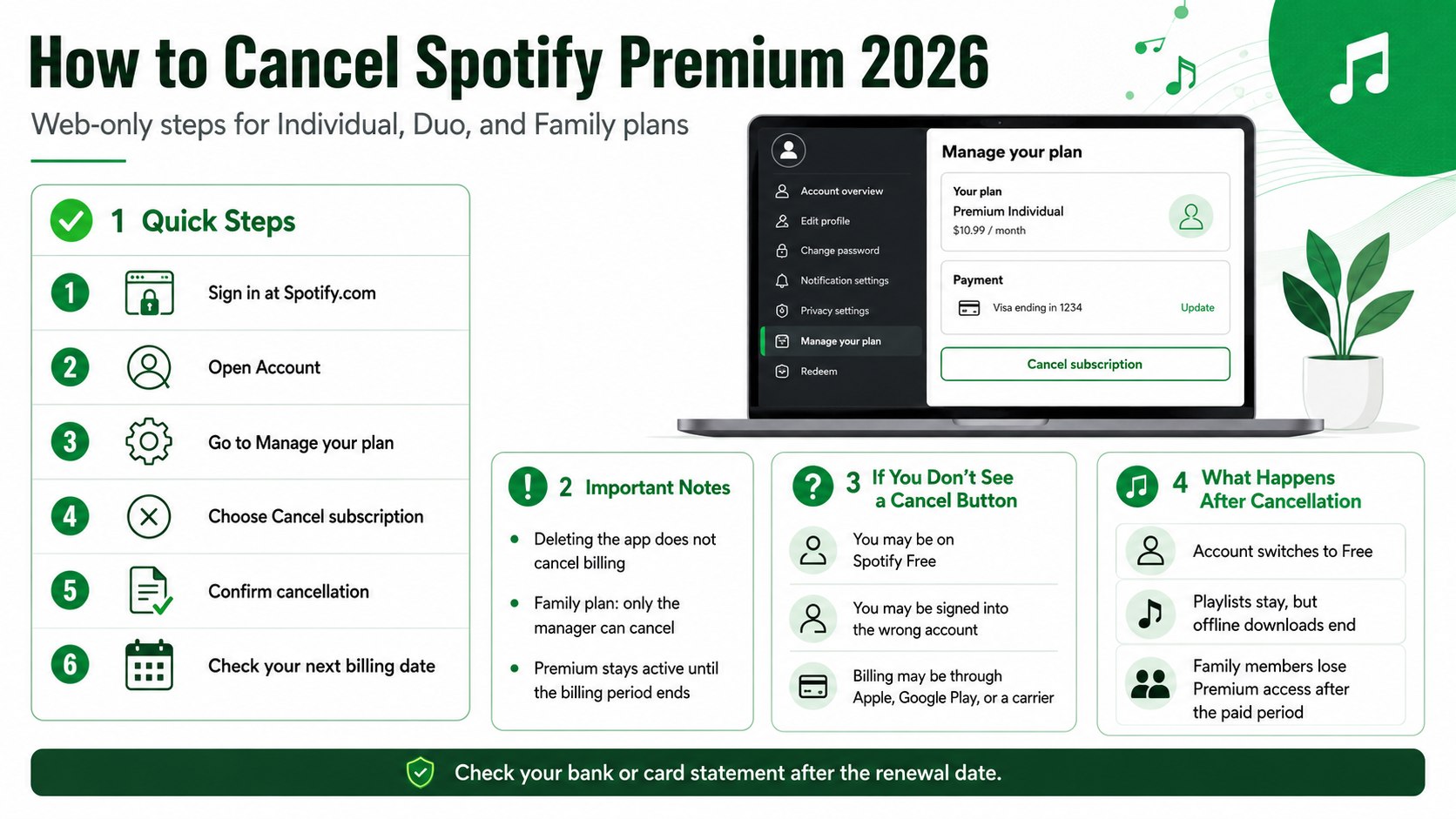
If the goal is to stop paying for Spotify, how to cancel Spotify Premium 2026 comes down to one web-only task: sign in at Spotify.com, open your account page, go to Manage your plan, and choose Cancel subscription. The process usually takes under 5 minutes if the account owner knows the login and has access to the email or phone number used for the account, аs noted by Baltimore Chronicle.
For a Spotify Premium Family plan, the plan manager must cancel from the web account page. Family members cannot cancel the shared bill from their own member accounts, and deleting the app from an iPhone, Android phone, Windows laptop, or smart TV does not stop billing.
Key takeaways
- Cancel Spotify Premium from the web account page, not by deleting the app or removing a payment card.
- Premium usually remains active until the next billing date, then the account switches to Spotify Free.
- Family plan managers should notify members before canceling because all linked Premium accounts lose paid features.
What you need before you cancel
Gather the login details before starting, because Spotify may ask for a password, email verification, or a login through Apple, Google, Facebook, or a phone number. For Family and Duo plans, the person canceling must use the manager account, not a regular member account.
You need:
- A web browser on a phone, tablet, laptop, or desktop computer
- The Spotify account email, username, phone login, or connected Apple, Google, or Facebook login
- Access to the plan manager account for Premium Family or Premium Duo
- The payment card, PayPal account, or mobile carrier bill used for the subscription
- About 5 minutes for a direct Spotify subscription
- More time if billing runs through Apple, Google Play, Verizon, AT&T, T-Mobile, or another partner
- No cancellation fee for Spotify Premium itself as of 2026
Spotify’s official support page says Premium can be canceled from the account page and that paid access continues until the next billing date before switching to Free. The official cancellation page is available through Spotify Support.
Households that review several recurring charges at once should also check how paid trials turn into monthly bills. Baltimore Chronicle has a related guide on avoiding unexpected automatic subscription charges, which covers reminders, virtual cards, cancellation timing, and refund requests.
Spotify is often one of several entertainment charges sitting beside streaming TV, cloud storage, audiobook apps, fitness apps, and mobile add-ons. The practical goal is not only to cancel one plan, but to make sure the same household does not keep paying through a duplicate login, partner bundle, or forgotten trial.
How to cancel Spotify Premium 2026 on the web
The safest route is the web account page because it shows who manages the plan, when the next billing date lands, and whether Spotify or a partner handles payment. This matters most for cancel Spotify Premium Family searches, where only the manager controls the shared bill.
Step 1: Go to Spotify.com in a browser
Open a browser and go to Spotify.com, then sign in with the account that pays for Premium. For Family, this must be the plan manager account, because Spotify apps can show account details but may not complete every billing change.
A common mistake is trying to cancel from the music player instead of the account page. If the plan section does not show billing controls, the wrong account is probably signed in.
Step 2: Open your account page
Select the profile icon or account menu, then open Account and look for the plan section that shows the current Premium subscription. This confirms whether the account is Individual, Duo, Family, Student, Basic, or Free.
A common mistake is logging into a family member’s account and not seeing the billing controls. In that case, sign out and try the email address used by the adult who originally created the Family plan.
Step 3: Choose Manage your plan
In the plan section, select Manage your plan or Manage your subscription. Spotify may display the plan name, next billing date, and payment method, which helps confirm that the subscription is active and billed directly by Spotify.
A common mistake is assuming Premium is canceled because a card expired. Failed payments can still create account notices, retry attempts, or confusion when the card is updated later.
Step 4: Select Cancel subscription
Choose Cancel subscription or Cancel Premium, then continue through Spotify’s confirmation screens. Do not stop at the first downgrade or offer screen unless the page confirms cancellation.
This step matters because subscription services often show a retention offer before the final confirmation. A common mistake is closing the tab before the confirmation message appears.
Step 5: Save the confirmation
Take a screenshot or save the confirmation email if Spotify sends one, then write down the date your account is scheduled to switch to Free. This gives you proof if a charge appears after cancellation.
A common mistake is relying on memory when several family subscriptions renew around the same week. Save the confirmation in the same place as other household billing records.
Step 6: Check the next billing date
Spotify normally keeps Premium active until the end of the paid billing period. If your billing date is June 18, for example, canceling on June 3 usually means Premium features continue until June 18.
This explains why the app may still show Premium after cancellation. A common mistake is canceling, seeing Premium still active, and assuming the cancellation failed.
Step 7: Tell Family plan members
If the plan is Premium Family, tell the other members that their accounts will move out of the paid family plan after the billing period ends. Playlists and profiles should remain, but paid features will end.
This prevents confusion for spouses, roommates, children, or relatives who use separate accounts under one bill. A common mistake is canceling during a trip or school week without warning people who rely on offline downloads.
Step 8: Review your bank or card statement
After the next renewal date passes, check the card, PayPal account, or bank statement connected to Spotify. Look for any new charge from Spotify USA, Spotify, Apple, Google Play, or a mobile carrier.
This catches partner billing, duplicate accounts, or a cancellation that happened after a payment had already processed. A common mistake is checking only the app instead of the payment account.
Spotify Premium prices in the USA as of 2026
Price is usually the reason people search for Spotify Premium cancellation steps. As of 2026, Spotify lists US Premium Individual at $12.99 per month, Student at $6.99 per month, Duo at $18.99 per month, and Family at $21.99 per month on its US plan pages.
The Family plan covers up to 6 Premium accounts for family members living under one roof, according to Spotify’s US Family page. Spotify’s current US Premium pricing is listed on the official Spotify Premium page.
| Spotify plan in the USA | Monthly price as of 2026 | Who controls cancellation | What happens after cancellation |
|---|---|---|---|
| Premium Individual | $12.99 | Individual account owner | Account switches to Spotify Free after the paid period |
| Premium Student | $6.99 | Student account owner | Account switches to Free; student eligibility does not erase the old billing history |
| Premium Duo | $18.99 | Duo plan manager | Both linked accounts lose Duo Premium features after the paid period |
| Premium Family | $21.99 | Family plan manager | Up to 6 linked accounts lose Family Premium features after the paid period |
For households comparing streaming costs, the useful number is annual spend. A $21.99 Family plan equals $263.88 over 12 months before any taxes, card fees, or third-party bundle adjustments.
Parents reviewing entertainment bills often compare Spotify Family with video subscriptions. A similar cancellation workflow appears in Baltimore Chronicle’s guide on canceling Netflix without extra charges, especially around billing dates, account access, and final confirmation screens.
Spotify Family often sits in the same budget category as Netflix, Disney+, Hulu, YouTube Premium, Apple Music, Amazon Music Unlimited, and Audible. If a household keeps multiple entertainment subscriptions, canceling Spotify may be only one part of a wider monthly bill cleanup.
What happens to a Spotify Family plan after cancellation
Canceling Family does not delete the family members’ Spotify accounts. It removes the paid Family plan after the current billing period, which means each member keeps a separate account but loses Premium benefits tied to that shared subscription.
Family members should expect ads, no offline downloads, and limits that apply to Spotify Free. Downloaded music, albums, and playlists may no longer play offline once the paid period ends.
The plan manager should check three things before cancellation:
- Whether a child or household member uses downloaded playlists for school, commuting, flights, or road trips.
- Whether another adult in the household plans to start a separate Premium Individual, Duo, or Family plan.
- Whether the family is canceling completely or switching to a cheaper plan.
For some households, stop Spotify Premium billing means canceling the paid plan entirely. For others, it means moving from Family to Individual or from Family to Basic Family where available.
Direct Spotify billing vs Apple, Google Play, and partner billing
Not every Spotify charge is billed by Spotify directly. Some older subscriptions, trials, and bundles may run through Apple, Google Play, a mobile carrier, broadband provider, or another partner.
If Spotify’s account page says another company manages payment, cancellation must happen through that company. Spotify Support says partner-managed plans require the user to contact that company, and contact details may appear under Payment on the account page.
| Billing source | Where to cancel | Common clue |
|---|---|---|
| Spotify direct | Spotify.com account page | Payment method appears inside Spotify account settings |
| Apple | Apple ID subscriptions | Charge may appear through Apple on card statements |
| Google Play | Google Play subscriptions | Charge may appear through Google or Google Play |
| Mobile or internet provider | Carrier or provider account | Spotify appears as a bundle, add-on, or promotional plan |
This is where cancel Spotify subscription online can become confusing. The Spotify account page is still the right first stop because it should show whether Spotify can cancel the plan directly or whether another billing company controls the subscription.
Partner billing matters because canceling on Spotify may not be possible when Apple, Google Play, Verizon, AT&T, T-Mobile, or another company owns the payment relationship. In that case, the cancellation must happen inside the partner’s subscription or account management system.
Refunds, billing dates, and free trials
Spotify’s refund policy says users who cancel Premium can keep what they paid for until the end of the billing period, then the account switches to Free. Spotify also states that if a user cancels during a zero-priced free trial, the account switches to Free immediately.
That means a normal paid cancellation does not usually produce a prorated refund. If the charge posted just before cancellation, Premium may continue until the next billing date rather than reversing the payment.
Free trials need extra care. Someone who signs up for a 2026 offer, forgets the renewal date, and cancels after the first paid charge may not get the same result as someone who cancels before the trial converts.
People moving away from Spotify may also be comparing Apple’s ecosystem. Baltimore Chronicle’s guide on uploading music to Apple Music is useful for readers who want to keep a personal library organized before switching services.
The best time to cancel is usually a few days before renewal, not a few hours before a card is charged. This leaves room to handle login problems, partner billing, or a missing cancellation button before the next payment attempt.
Troubleshooting Spotify cancellation problems
- There is no cancel button. The account may already be Free, logged into the wrong profile, or billed by a partner such as Apple, Google Play, Verizon, AT&T, or T-Mobile.
- Spotify still shows Premium after cancellation. Premium usually remains active until the next billing date, so check the date shown on the account page.
- A charge appeared after cancellation. The payment may have processed before cancellation, or a different Spotify account may still be active under another email.
- Family members still have Premium. The paid period may not have ended yet, or a different plan manager may be paying for a separate Family plan.
- The login does not work. Try email, username, phone number, Apple, Google, and Facebook login methods before assuming the account is gone.
One common household issue is duplicate accounts. A parent may have one Spotify account tied to Gmail, another tied to Facebook, and a Family plan created years earlier with an old email address.
If bank statements show Spotify charges but the visible account says Free, search email inboxes for Spotify receipts. Check Gmail, Outlook, iCloud, Yahoo, and any work email used for older subscriptions.
Checklist before you close the tab
Use this checklist after pressing the cancellation button. It reduces the chance of paying for another month by accident.
- The account page shows a scheduled switch to Spotify Free.
- The next billing date is written down or saved in a screenshot.
- The confirmation email is saved, if Spotify sends one.
- Family or Duo members know when Premium features will end.
- Offline playlists are no longer needed for travel, work, school, or commuting.
- The payment method is checked after the next renewal date passes.
- Apple, Google Play, or carrier billing has been checked if Spotify does not show a cancel option.
- Any replacement plan, such as Free, Individual, Duo, Family, Apple Music, Amazon Music Unlimited, or YouTube Music, is already decided.
FAQ
Can I cancel Spotify Premium from the app in 2026?
The reliable method is the web account page at Spotify.com. The app can show account and billing details, but web cancellation is the clearest route for direct Spotify subscriptions.
Who can cancel a Spotify Premium Family plan?
The Family plan manager must cancel the shared subscription. A family member account can leave the plan or change its own settings, but it cannot stop the household bill unless it is the manager account.
Will I lose my playlists if I cancel Spotify Premium?
Canceling Premium does not normally delete playlists or the account. The account switches to Spotify Free after the paid period, but Premium features such as offline downloads, ad-free listening, and unrestricted mobile playback may end.
Does Spotify give a refund after cancellation?
Spotify usually keeps Premium active until the end of the billing period instead of issuing a prorated refund. Free trials may switch to Free immediately if canceled during a zero-priced trial period.
Why am I still being charged after canceling Spotify?
The charge may have processed before cancellation, another Spotify account may still be active, or billing may run through Apple, Google Play, a mobile carrier, or an internet provider. Check the payment section on the Spotify account page and review the card statement label.
Can I rejoin Spotify Premium Family later?
A user can usually subscribe again later, but plan prices, free trials, eligibility, and Family address rules depend on Spotify’s terms at the time of reactivation. Check the official plan page before restarting a paid plan.
Earlier we wrote about How to Retile a Bathroom Yourself: DIY Tile, Mortar, Grout, and Tools Guide