

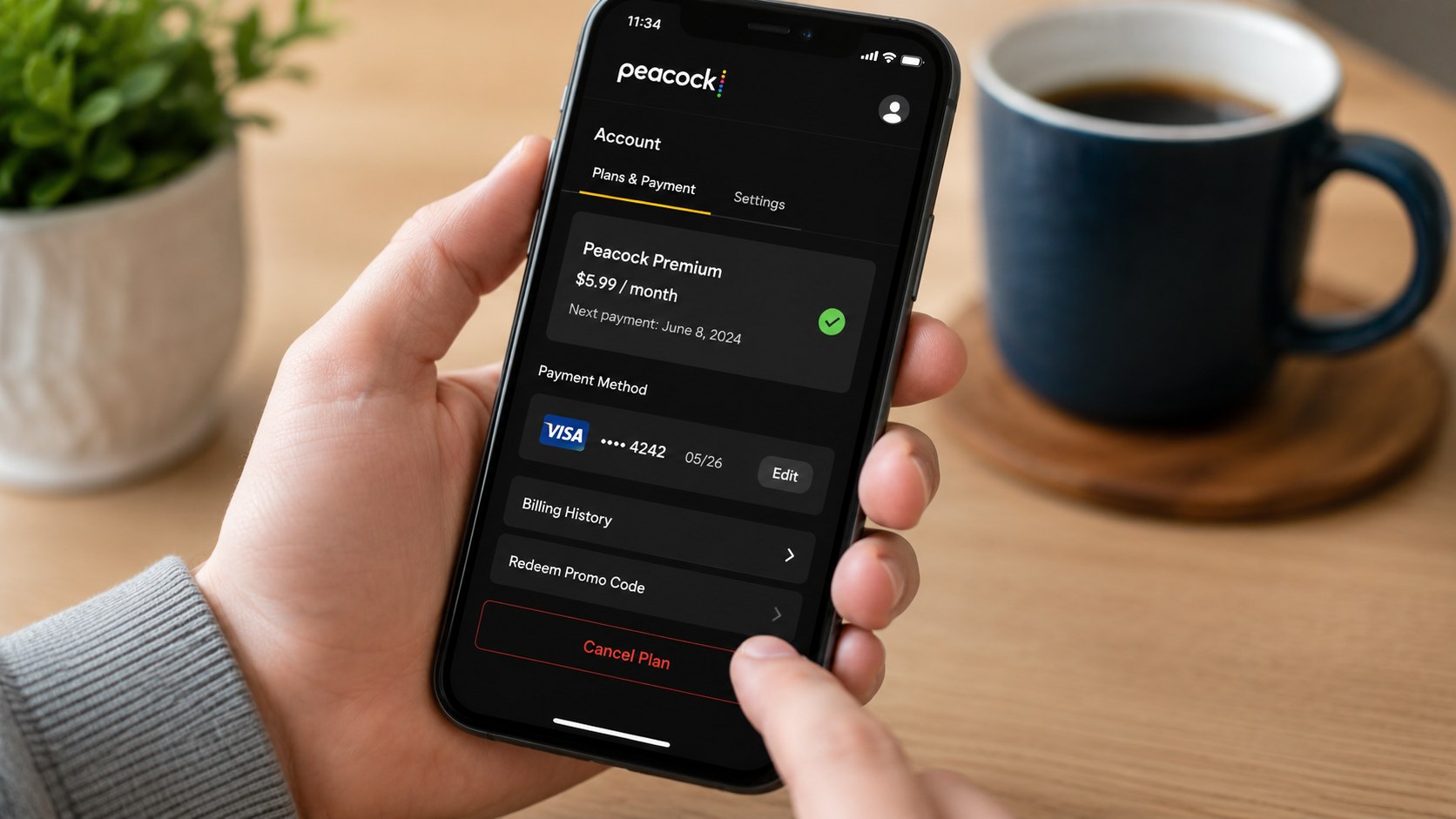
How to cancel Peacock subscription 2026: sign in to the account that pays for Peacock, open “Plans & Payments,” select “Cancel Plan,” and complete the final confirmation. The process usually takes less than 5 minutes when Peacock bills you directly. Subscriptions purchased through Apple, Google Play, Roku, Amazon, YouTube, or another provider must be canceled through that provider, as noted by the Baltimore Chronicle editorial team.
Canceling normally stops the next renewal without immediately ending your access. Premium or Premium Plus should remain available until the expiration date shown in your account. Deleting the Peacock app, removing a profile, or signing out will not stop recurring billing.
Key takeaways
- Cancel through the company that processes the payment, not necessarily through the Peacock app.
- Paid access usually continues until the end of the current monthly or annual billing period.
- Save the confirmation email and inspect your next card or bank statement for another charge.
What you need before canceling Peacock
Gather the account and billing information before opening Peacock’s settings. This avoids delays caused by forgotten passwords, shared family accounts, or subscriptions registered under an old email address.
You will need:
- the email address connected to your Peacock account;
- your Peacock password or access to the password-reset inbox;
- a phone, tablet, or computer with a web browser;
- your latest bank, credit card, PayPal, or app-store statement;
- access to Apple, Google, Roku, Amazon, YouTube, or another billing account;
- about 5 to 10 minutes.
Check the merchant name attached to the latest payment. A charge labeled Peacock or Peacock TV usually indicates direct billing. A charge showing Apple, Google, Roku, Amazon, or another company suggests that the subscription is controlled by that provider.
Do not create a new Peacock account when you cannot remember the login details. A new profile will not contain the existing paid plan. Search your email accounts for receipts, renewal notices, or password messages first.
Removing Peacock from an iPhone, Android phone, Roku TV, Fire TV device, gaming console, or smart television does not cancel the plan. The recurring payment remains active until the billing provider receives and confirms a cancellation request.
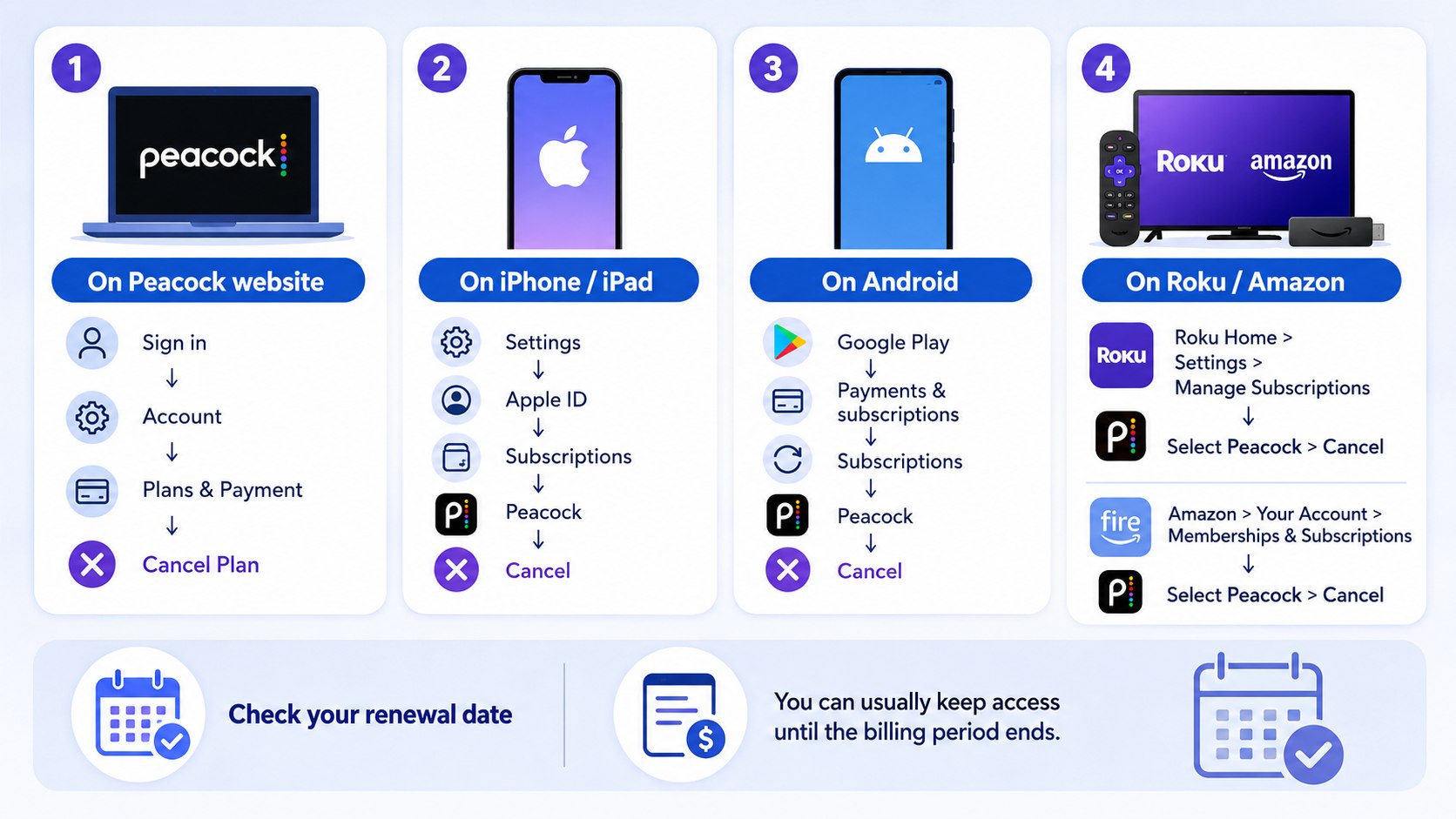
Step 1: Identify who bills your Peacock subscription
Sign in to Peacock and open the account page. Select “Plans & Payments” and look for the current plan, renewal date, payment method, and any message stating that billing is managed by a partner.
This step determines where the cancellation must be completed. Peacock cannot directly cancel every subscription sold through another company. The most common mistake is searching Peacock’s website for a button when Apple, Google Play, Roku, Amazon, or another provider controls the payment.
The billing arrangement also determines which customer-service team can investigate an unexpected charge. Take a screenshot showing the plan, renewal date, and billing provider before changing anything.
| Subscription source | Where to cancel | What to verify |
|---|---|---|
| PeacockTV.com | Peacock Plans & Payments | Cancellation message and expiration date |
| Apple App Store | Apple ID subscription settings | Peacock status and expiration date |
| Google Play | Payments & subscriptions in Google Play | Auto-renewal is disabled |
| Roku | Roku account or device subscription menu | Renewal date has been removed |
| Amazon or Prime Video | Amazon memberships and subscriptions | Peacock is marked canceled |
| YouTube Primetime Channels | YouTube purchases and memberships | Paid membership has an end date |
| Walmart+ or another partner | Partner membership settings | Whether the benefit or upgrade remains active |
Promotional and partner plans require extra attention. A free Peacock benefit may be tied to Walmart+, Instacart+, Xfinity, a Mastercard offer, or another qualifying service. Canceling Peacock may not cancel the underlying partner membership.
Some accounts also combine a free or discounted Premium benefit with a paid Premium Plus upgrade. Review both charges before making changes. Removing only the upgrade may leave the basic Premium benefit active.
Readers auditing several streaming payments can compare this process with Baltimore Chronicle’s guide on how to cancel a Hulu subscription in 2026. Hulu users face similar problems involving app-store billing, bundles, and deleted apps.
Step 2: Sign in through a web browser
Visit PeacockTV.com using a browser and select “Sign In.” Enter the email address and password connected to the paid account, then open the account menu.
A browser usually displays more complete billing controls than a television app. Some Roku, Fire TV, Apple TV, console, and smart-TV interfaces focus on playback rather than account management.
Use Peacock’s password-reset option when necessary. Do not assume the email address used for a viewing profile is the same address that receives payment receipts.
Shared households should ask who originally registered the subscription. A spouse, roommate, parent, or former household member may control the billing account even when several people use separate Peacock profiles.
Step 3: Open Plans & Payments
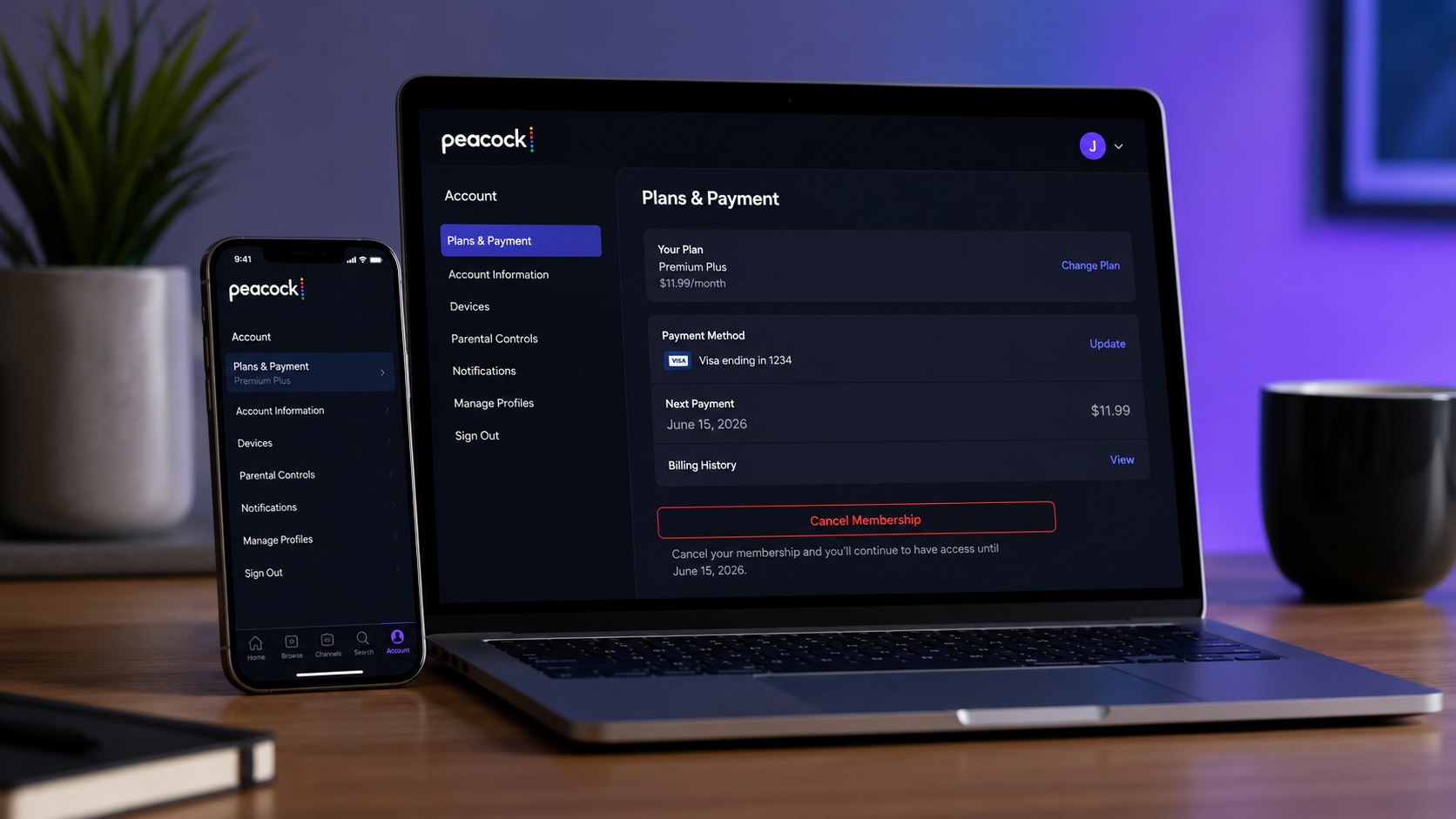
Inside the account, select Plans & Payments. Review the plan name, billing frequency, renewal date, price, and payment method before choosing any cancellation option.
As of 2026, the standard Peacock Premium price is $10.99 per month or $109.99 per year. Peacock Premium Plus costs $16.99 per month or $169.99 per year. Taxes, partner offers, promotional discounts, and qualifying membership benefits can change the amount shown in an individual account.
Premium includes advertising and the broader Peacock catalog. Premium Plus removes most advertising, supports downloads on eligible devices, and may include access to a local live NBC channel. Some live events, channels, and programs can still contain advertising.
Confirm whether you want to cancel the service entirely or only move from Peacock Premium Plus to Premium. A downgrade reduces the plan level but keeps recurring billing active.
Step 4: Select Cancel Plan and review each screen
Choose “Cancel Plan” and continue through the displayed prompts. Peacock may present a lower-priced plan, promotional rate, pause option, or downgrade before showing the final cancellation control.
Read each page carefully. Selecting Premium instead of Premium Plus does not cancel Peacock. It only replaces the more expensive tier with a lower-priced subscription.
The same distinction appears across other streaming services. Baltimore Chronicle’s instructions on how to cancel Disney Plus in 2026 explain why changing a bundle or plan does not always stop the underlying payment.
Do not close the browser after the first cancellation screen. The request is not complete until Peacock displays a clear confirmation and provides an expiration date.
Step 5: Confirm the cancellation request
Select the final confirmation button and wait for the success message. The account should state that the plan is canceled or that paid access will end on a specified date.
Take a screenshot that includes the date and account status. Peacock should also send a confirmation email. Keep both records until at least one billing cycle has passed.
The most common mistake is leaving the process after viewing a retention offer. Opening the cancellation page, rejecting an offer, or clicking “Continue” does not necessarily stop renewal.
Check the email address connected to Peacock, including the spam and promotions folders. If no confirmation arrives, return to Plans & Payments and inspect the subscription status again.
Step 6: Cancel Peacock through Apple, Google Play, Roku, Amazon, or YouTube
Cancel Peacock through Apple
Open Settings on the iPhone or iPad, select your name, and choose “Subscriptions.” Select Peacock, tap “Cancel Subscription,” and confirm the request.
Use the same Apple ID that originally purchased Peacock. A common mistake is checking a different personal, family, or work Apple ID that has no active subscription.
Cancel Peacock through Google Play
Open Google Play, select the profile icon, and choose “Payments & subscriptions.” Open “Subscriptions,” select Peacock, and follow the cancellation prompts.
Confirm that the status changes from renewing to canceled. Uninstalling Peacock from an Android phone or Google TV device does not stop the Google Play payment.
Cancel Peacock through Roku
Sign in at Roku’s website and open “Manage your subscriptions.” You may also highlight the Peacock channel on a Roku device, press the star button, and review the subscription options.
Select the option that turns off auto-renewal. Removing the channel alone does not always cancel a subscription billed by Roku.
Cancel Peacock through Amazon or Prime Video
Open your Amazon account and review “Memberships & Subscriptions,” “Your Apps,” or Prime Video channel settings. Locate Peacock and disable automatic renewal.
Amazon may show an expiration date instead of immediately removing access. Check the confirmation email and make sure no later renewal remains scheduled.
Cancel Peacock through YouTube Primetime Channels
Open YouTube, select “Purchases and memberships,” and locate the Peacock Premium Plus membership. Select the management option and confirm cancellation.
Peacock Premium Plus became available through YouTube Primetime Channels in 2026. That subscription must be managed through YouTube rather than Peacock’s direct billing page.
Step 7: Verify the expiration date and watch your next statement
Return to the account page and confirm that automatic renewal is disabled. The plan should display an end date rather than another charge date.
Cancel Peacock auto renewal at least 24 to 48 hours before the scheduled payment when possible. Waiting until the final hours can create uncertainty if the payment has already entered processing.
Canceling normally does not produce a prorated refund. A monthly subscriber can usually watch until the current month ends. An annual subscriber may retain access for the remaining paid term.
Review the next bank, card, PayPal, Apple, Google, Roku, or Amazon statement. A charge appearing after cancellation may relate to a renewal processed earlier, another Peacock account, or a different billing provider.
Keep the confirmation email, screenshots, merchant name, payment date, and amount. These records make it easier to request help or dispute an unauthorized recurring charge.
Households also canceling live television can consult Baltimore Chronicle’s guide on how to cancel YouTube TV in 2026. It covers direct billing, pauses, final access, and separate Google-owned subscriptions.
Troubleshooting Peacock cancellation problems
Most failed cancellations involve the wrong account, an outside billing provider, or an unfinished confirmation process. Match the problem with the relevant scenario below.
- No Cancel Plan button: Check whether Apple, Google Play, Roku, Amazon, YouTube, or a partner manages the subscription.
- The paid account is missing: Search all email inboxes for Peacock receipts and reset passwords for likely addresses.
- Peacock still works: Access usually remains available until the paid billing period expires.
- You were charged after canceling: Compare the payment date with the recorded cancellation time and renewal date.
- The plan changed to Premium: A downgrade occurred, but recurring billing was not fully canceled.
- No confirmation email arrived: Reopen Plans & Payments and verify that the account shows an expiration date.
When contacting support, provide the account email, charge amount, transaction date, billing provider, and cancellation confirmation. Never send a full credit card number through ordinary email or unsecured chat.
If a charge remains unresolved, contact the company that processed it. Apple, Google, Roku, Amazon, YouTube, and card issuers maintain separate payment records.
Consumers should document every cancellation attempt. The Federal Trade Commission’s subscription guidance recommends saving cancellation records and checking financial statements for unauthorized charges.
A card dispute should describe the dates accurately. State whether the charge was unauthorized, processed after a confirmed cancellation, or connected to an account you cannot identify.
FAQ about canceling Peacock Premium and Premium Plus
Can I cancel Peacock immediately?
Yes. You can submit a cancellation at any time. Paid access usually remains available until the current billing period ends, while the next renewal is stopped.
Will Peacock refund the unused part of my annual subscription?
Peacock payments are generally nonrefundable. Annual subscribers should normally expect access until the paid expiration date rather than a prorated refund. Exceptional cases depend on Peacock or the outside billing provider.
How do I cancel Peacock Premium Plus but keep Premium?
Open Plans & Payments and choose the option to change or downgrade the plan. Review the new price and effective date before confirming. The account will continue renewing at the Premium rate.
Why can’t I cancel Peacock through the app?
The app may not contain complete billing controls. The subscription may also be managed by Apple, Google Play, Roku, Amazon, YouTube, or another company. Use the provider shown in your payment history.
Does deleting my Peacock account cancel the subscription?
Do not rely on account deletion. Cancel the paid plan and obtain confirmation before deleting profiles or requesting account removal. Outside billing can continue independently.
Can I restart Peacock after canceling?
Yes. Sign in with the same account and select an available plan. Prices, promotions, benefits, and content may differ when you return.
Earlier we wrote about Is UPS My Choice Worth It in 2026? Free vs Premium Features Explained